Retail Software
 Distribution Software
 Retail Chain

How to Track Serial Numbers in an Electronics Store: Methods & Best Practices

A customer walks in with a laptop that has a dead motherboard. The receipt says “Laptop, ₹52,000.” No serial number. You can’t tell if you sold it, whether it’s still under warranty, or whether the distributor will take it back. So you eat the cost, or you argue for forty minutes and lose the customer anyway.
Most electronics retailers hit this problem eventually. Serial number tracking for an electronics store is how you stop it. Below I cover what to track, five ways to do it, how to set it up, and the mistakes that trip up even experienced shop owners.
To track serial numbers in an electronics store, capture each unit’s serial number when stock arrives, scan it into an inventory or POS system, and link it to the SKU and supplier. Scan it again at sale and attach it to the customer’s invoice. Then use that record for returns, warranty claims, and audits. Barcode scanning with software is the most accurate method.
What Is Serial Number Tracking?
Serial number tracking means recording the unique identifier of every individual unit you receive, store, move, and sell, instead of just counting how many you have.
If you stock 40 units of one phone model, a basic system says “40 in stock.” A serial-tracked system says which 40, who supplied each, which ones are on the shelf, and which one went to a particular customer last Tuesday.
Serial number vs. SKU vs. IMEI vs. lot number
These get mixed up constantly, so here’s the quick version.
| Identifier | What it identifies | Example use |
| SKU | A product type (your internal code) | All 128GB black phones of one model |
| Serial number | One specific physical unit | A single laptop |
| IMEI | One specific mobile device (a type of serial number, tied to the cellular modem) | Phones, tablets with SIM |
| Lot/batch number | A group produced together | Batteries, chargers, consumables |
The SKU tells you what it is. The serial number tells you which one it is. You need both. For a deeper breakdown, see our guide on serial number vs. SKU vs. IMEI.
What is serialized inventory?
Serialized inventory is stock where every unit is tracked individually by its own unique number. It’s the standard approach for high-value, warranty-backed goods, which describes most of what an electronics store sells. If you want the full explanation, we cover it in What Is Serialized Inventory?.
Which products should you serialize?
Not everything needs it. Tracking serials on a USB cable is a waste of time. Serialize anything expensive, easy to steal, or covered by a warranty:
- Smartphones and tablets
- Laptops and desktops
- TVs and monitors
- Cameras and lenses
- Gaming consoles
- Smartwatches and earbuds
- High-value accessories (premium headphones, GPUs, SSDs)
A good rule of thumb: if you’d be upset about losing one unit, serialize it.
Why Electronics Stores Need Serial Number Tracking
Beyond fixing the warranty argument above, here is what you actually get.
Less theft and shrinkage- When every unit has a recorded serial, a missing item shows up in an audit as a specific device, not a vague count that’s off by two. That makes internal theft much harder to hide. More on this in our post on reducing inventory shrinkage in electronics retail.
Faster warranty checks- Type in the serial and you see the sale date, the buyer, and the coverage period. No digging through paper invoices.
Return fraud protection– Individuals sometimes swap a different item (damaged, outdated, or affordable) than the one they bought. Serial number verification detects deception like that.
Supplier claims- When a batch of items becomes defective, the serial records enable you to identify the supplier and the date of delivery at which the items were sent out.
Recalls- When a producer recalls a specific range of serials, it only takes you moments to identify the affected customers.
Clean audits and insurance claims- After a break-in or a fire, a serial-level list of stock is far more convincing than “about 30 phones.”
Compliance- If you are engaged in the retailing of refurbished and pre-owned goods, GST invoicing and local laws lay down strict requirements for the identification of every product.

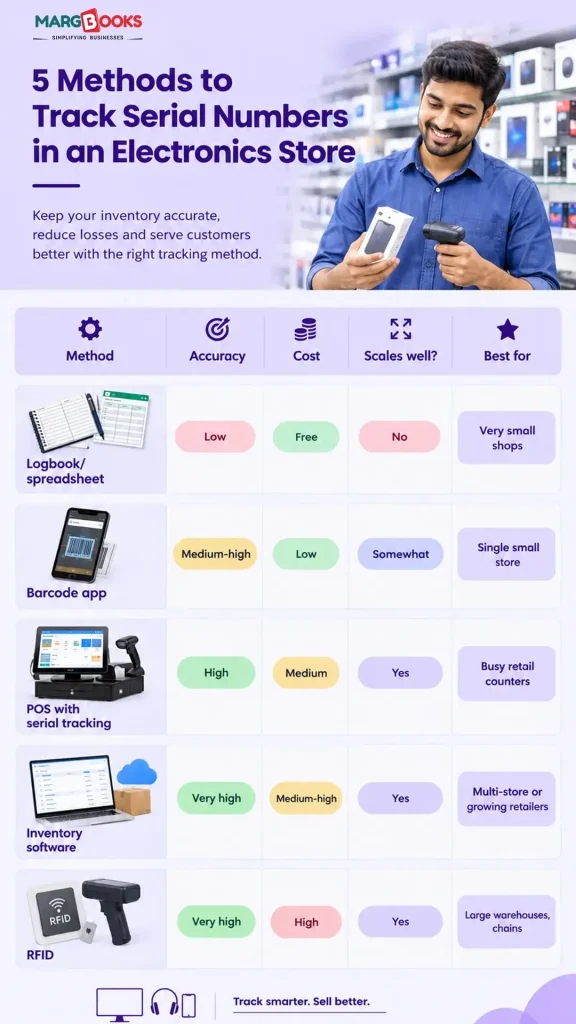
5 Methods to Track Serial Numbers in an Electronics Store
Here are the five methods that are mostly required or used to track Serial Numbers in an electronics store.
1. Manual logbooks and spreadsheets
This is where most small shops start. You write or type each serial into a register or an Excel or Google Sheet. It costs nothing and works fine if you sell a handful of devices a week. The problems show up fast, though. Typos are common (a lowercase “l” and the number “1” look identical when handwritten). Nothing stops you from entering the same serial twice. Two staff members can overwrite each other’s work. And a spreadsheet can’t tell you in real time whether a unit is in stock. Fine for a very small shop. Painful beyond that. If you’re deciding when to move on, read Excel vs. inventory software: when to upgrade.
2. Barcode scanning with a standalone inventory app
The serial number can be found in the form of a barcode on most of the product boxes, which can be read by any cheap handheld scanner or even the camera of your smartphone. This removes most of the typing errors and speeds up receiving a lot. The catch is that a standalone app often doesn’t talk to your billing or accounting, so you end up reconciling two systems by hand.
3. POS systems with built-in serial number tracking
A POS system with serial number tracking prompts the cashier to scan the unit’s serial at checkout. The serial is then printed on the invoice and stored against the customer. This is the sweet spot for most retail counters, because tracking happens during the normal sale instead of as an extra chore. Just check that the POS also captures serials at receiving. Some only capture them at the sale, which leaves a gap (more on that in the mistakes section).
4. Dedicated inventory management software
Inventory management software for electronics stores tracks serials from purchase order to goods receipt, branch transfer, sale, return, and warranty. It handles multiple locations, prints labels, and gives you a full history for every unit. It costs more than the options above and takes a few days to set up properly. But if you run more than one outlet or sell a few hundred devices a month, it’s usually the option that pays for itself.
5. RFID and automated tracking
The RFID tags help scan whole shelves or cartons without the need to look at the barcodes separately. It is less time-consuming and more accurate; however, the tags, readers, and implementation required for this technology cost a lot. It makes sense for large warehouses and big-chain retailers, not for a typical shop. Compare the options in barcode vs. QR code vs. RFID.
How to Set Up Serial Number Tracking?
Here is a step-by-step serial number tracking guide.
- Step 1: Begin with the 20% of the highest-value products.
- Step 2: Choose a solution that has support for serial numbers natively.
- Step 3: Clean up the product data during the changes to make sure everything is correct. Messy product data makes serial records messy too.
- Step 4: Record serials at the time of delivery – when the unit arrives, make sure that each of the items you receive matches the purchase order so you do not skip this crucial step.
- Step 5: Scan during branch transfers. If stock moves between stores, scan it out and scan it in so nothing disappears in transit.
- Step 6: Record the serial at the sale. Scan it at the counter and make sure it prints on the invoice. Barcode scanning makes this a two-second job.
- Step 7: Link the serial to the customer and warranty period. Store the buyer’s contact details and the warranty end date so claims take seconds. Warranty management software automates this.
- Step 8: Set rules for returns – scan each item back into the system when returned, marking it as sellable, refurbished, or sent back to the supplier.
- Step 9: Audit regularly. Count a sample of serialized stock each week and compare it against the system. See our inventory audit checklist.
If you need labels for items that don’t come with a scannable code, a barcode label generator will cover it.
Best Practices for Serial Number Management
In this section, we are discussing some of the best practices for Serial Number Management.
- Scan, don’t type: Every manual entry risks a typo. A scanner costs far less than one mistaken warranty claim.
- Capture at receiving: If you only record serials at sale, you have no proof of what you bought, and theft before sale goes unnoticed.
- Block duplicates: Good software rejects a serial that already exists. If not, stop and take note.
- Put your serials on the invoice and warranty card: it will take out any possible misunderstandings, plus it will make your company look more responsible.
- Restrict access for record modifications: let cashiers sell while prohibiting them from changing or deleting serial data. Maintain a log of each such action.
- Count your expensive merchandise weekly: phones and laptops are usually the most frequently lost or stolen items from the store. See our guide to running a cycle count on high-value electronics.
- Write a one-page SOP: New staff should know exactly when to scan and what to do if a serial won’t read. Two copies of the photographs will be adequate for the requirements.
- Integrate your devices: The serial information must be transmitted to your inventory system without being isolated in one place.
Common Mistakes to Avoid in Serial Number Management
In this section, we are discussing the common mistakes to avoid while doing serial number management.
- Tracking only at sale: Without receiving records, you can’t tell whether a unit was ever yours, and you can’t catch shortages from suppliers.
- Mixing serialized and non-serialized products: If a laptop and a phone case follow the same workflow, staff will start skipping steps for both. Keep the rules separate and obvious.
- Allowing blank or duplicate serials: Even occasional “I’ll add it later” entries corrupt your data. Later never comes.
- Ignoring returns: A returned unit that isn’t re-scanned becomes a ghost in your inventory. You’ll count it as sold when it’s actually sitting in a drawer.
- Using disconnected tools: A spreadsheet for serials, one app for billing, another for accounting. Every handoff is a place where data goes missing. Our post on how to handle returns and RMAs covers this in more depth.
What to Look For in Serial Number Tracking Software
When you compare options, check for these:
- Serial capture at purchase, transfer, sale, and return
- A complete lifecycle history for every unit
- Warranty and expiry tracking
- Multi-store support
- Barcode and QR label printing
- Integrations with accounting, e-commerce, and GST
- Reports by serial: in stock, sold, returned, under RMA
Example: How a Mobile and Laptop Retailer Cut Warranty Disputes
Picture a retailer with three outlets selling phones and laptops. Before serial tracking, they handled roughly 15 warranty disputes a month, most of them about whether a device was actually sold by them or when. Staff dug through paper invoices, and customers got frustrated.
After moving to scan-at-receiving and scan-at-sale, every claim became a single lookup. Disputes dropped sharply because the evidence was already on screen. Supplier RMAs also got easier, since they could prove exactly which units came in on which delivery. That’s the real payoff: less time arguing, more time selling. For this type of business, a mobile shop software or laptop store software setup is usually the right fit.
Conclusion
Serial number tracking requires some skills: Record the serial numbers of goods right after receiving them instead of making the serial number hunting process when the item is sold. Scan the serial number instead of writing it down and connect it to the invoice and warranty period using an Electronic Store Software such as MargBooks. Conduct regular audits to avoid minor losses that might grow into significant ones. It might seem hard to start with many tasks from day one. It is enough to use this approach on your most expensive product and make it work.
FAQs
Q1. What is the best way to track serial numbers in an electronics store?
Implement barcode scanning integrated with inventory or Point of Sale systems and pick up serial numbers at receiving, transferring, selling, or returning the stock. This allows maintaining full traceability of every item. It is much more precise than manual data input and grows with the retail business.
Q2. Can I track serial numbers in Excel or Google Sheets?
Certainly, but only for very low volumes. Spreadsheets are prone to mistakes, duplicates, and conflicting information, and they won’t be able to provide instant stock updates. When a retail business starts to sell tens of devices, software becomes a safer option.
Q3. What is the difference between a serial number and a SKU?
SKU represents a type of product, for example, a certain phone model of a certain color. The serial number is used to define one particular item with this product SKU. One may use a SKU to keep stock levels under control and serial numbers to keep track of specific products.
Q4. How do I track serial numbers for returned or refurbished items?
Re-add the item back into the stock with the serial number and give it a labeling term. For the purpose of this tracking, it could be returned, remanufactured, or returned to the vendor, etc. There is also an option to keep sales history as reference material.
Q5. Does POS software support serial number scanning?
While it is true that many systems do this function, not all do. You should be sure to select a system that can ask for a serial number at the time of sale and never allow the same number to be given more than once or printed on bills. Make sure to choose a sales program that requires serial numbers during the process of delivery.
Q6. How do serial numbers help with warranty claims?
This serial number helps in the storage of information pertaining to the item and the time of sale and who bought it and what is its warranty. When the customer returns the item to the store, it will not take a long time for the employee to check the warranty and find out if it is still valid.
Q7. Is serial number tracking required by law for electronics retailers?
The rules and regulations vary among countries regarding what you sell. For instance, selling used or refurbished devices generally implies stricter identification and invoicing requirements. Look into the local laws or consult with a financial advisor because this information is general and shouldn’t be treated as advice.
Q8. How much does serial number tracking software cost?
As far as pricing is concerned, it can vary from small monthly fees for simple applications to payments for complete multi-store inventory systems. The costs depend on the number of users, locations, and features. Therefore, try to compare several alternatives according to your monthly revenues before making any decisions.

Muskan is a versatile content writer with two years of experience across finance, software as a service (SaaS), astrology, and education technology (edtech). She turns complex ideas into compelling content, whether it’s SaaS metrics, financial shifts, or the alignment of the stars.