Retail Software
 Distribution Software
 Retail Chain

How to Reconcile Cash and Digital Payments With POS Data

Picture closing time at a busy store. The POS says you sold ₹1,00,000 today. The drawer holds less cash than you expected, and the bank app hasn’t shown a single card settlement yet. Something is off, and nobody knows what.
This happens in almost every shop that takes more than one kind of payment. Usually, there are no incidents of theft or damage. Often the issue arises from timing differences, unrecorded refunds, or a cashier mistakenly pressing “cash” instead of “UPI” at checkout. POS reconciliation involves reconciling your POS’s reading of sales and payments received via cash, UPI, wallet, and cards. Below is a six-step process you can follow every day, along with an example calculation and a description of how to automate all that with POS billing software. Get the detailed report of your daily sales categorized according to the payment method, count the cash in the till, compare UPI and card transaction amounts with the settlement reports from payment providers, check the amounts credited by the bank minus the fees, and resolve any discrepancies that arise.
What is POS reconciliation?
It’s a tie-out between three things: your POS report, your cash drawer, and your money in the bank (including whatever your payment providers owe you but haven’t paid yet).
Why bother? A few reasons:
- Small cash leaks get caught while they’re still small.
- Your books and GST returns rest on correct numbers.
- You see the cash you really have, not just what the screen reported.
- When a staff member or customer disputes something, you have records to settle it.
Why POS Totals Don’t Match Cash and Bank Deposits
Before you lose your mind due to discrepancies, see if any of the following suspects are to blame:
- Settlement delays: Money from the card and wallet takes about 1-2 days (T+1 or T+2) to settle, meaning that sales made today will reflect in the bank statement only tomorrow.
- Fees are deducted first: Acquirers and gateways take applicable charges, i.e., MDR and GST, from the collected amount prior to your settlement; hence, the credited amount is always lower than the sale value.
- Refunds and reversals: Refunds or negative entries just decrease your amount or reverse the electronic payment already made in cash.
- Wrong payment method: An instance of a UPI sale acknowledged as cash results in dual summation, thus making it challenging to account for it.
- Other cash movements: Usage of petty cash, giving tips, availing of cash inflow or depletion from the drawer.
- Split payments: The payment being done partially via cash and UPI, which is incorrectly entered in accounting.
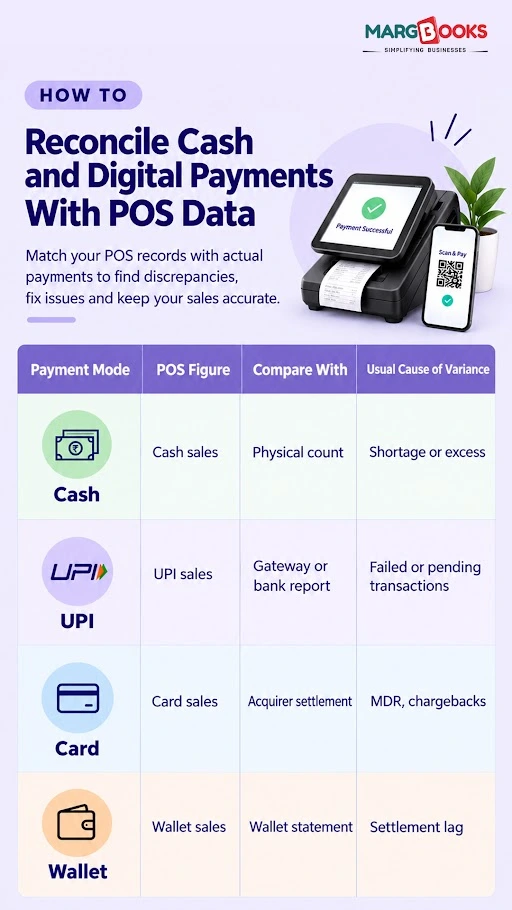
How to Reconcile Cash and Digital Payments With POS Data?
Here is a step-by-step procedure on how to reconcile cash and Digital payments with POS-
Step 1: Pull your sales report by payment mode
Export the day’s sales (or the shift’s, if you run shifts) and break it into cash, UPI, cards, wallets, and credit sales. Keep refunds and voids on their own lines. This is what you expected to collect, and everything else gets compared against it.
Step 2: Count the drawer
Cash is the easiest thing to check and the easiest thing to lose, so do this one carefully. The formula:
Expected cash = Opening float + Cash sales − Cash refunds − Cash payouts
Count what’s physically there and have the cashier sign off on the number. Whatever the gap is, log it as a shortage or excess. If you can, count at each shift change instead of once at night. When something is missing, you’ll know whose shift it was.
Step 3: Match digital payments to provider reports
Download the report from each provider: your UPI app or bank, your card machine’s acquirer, any wallets you accept. Compare totals for each payment mode first. Then go transaction by transaction using the ID, date, and amount.
Watch for:
- Payments the POS marked as successful that actually failed or are still pending
- Duplicate entries
- Chargebacks and reversals

Step 4: Check the bank statement
Now see what really arrived. Card and gateway credits will almost always come in below gross sales, because of MDR and GST on those charges, and they may arrive on a different date. Adjust for both before you call anything a mismatch.
A bank reconciliation feature can match these credits to your sales automatically. If you’d rather do it by hand, our bank reconciliation guide walks through it.
Step 5: Run down the differences
Pick a tolerance you can live with. ₹50 per shift on cash is common. Anything above it gets looked at. For each gap, trace it by transaction ID, shift, cashier, and payment mode. In our experience with this kind of work, nearly every difference falls into one of three buckets: timing, fees, or a tagging mistake.
Step 6: Post the entries and lock the day
Record journal entries for any cash shortage or excess, gateway fees, and refunds. Then lock the day so nobody can edit it later without a trace. Locking is what turns reconciliation from a one-time check into a real audit trail.
Daily vs. Weekly vs. Monthly Reconciliation: What to Do and When
When to do reconciliation is important, and here are details of the same-
- Every day: count cash and close the shift.
- Every week: check gateway and acquirer settlements.
- Every month: tie the bank to your books before you file GST returns.
Ten minutes a day is easy. A month of backlog takes days to untangle, and by then you can’t remember what happened on the 9th.
A worked example
Say you sold ₹1,00,000 today (we’re ignoring GST on the sales to keep the math simple):
- Cash: ₹40,000 expected, ₹39,800 counted, so ₹200 short
- UPI: ₹45,000, no fee
- Card: ₹15,000, with an assumed MDR of 1.8% (₹270) and 18% GST on that fee (₹48.60)
Net card settlement: ₹15,000 − ₹270 − ₹48.60 = ₹14,681.40
| Entry | Debit | Credit |
| Cash in hand | ₹39,800 | |
| Cash short/excess | ₹200 | |
| Sales (cash) | ₹40,000 | |
| Bank (UPI) | ₹45,000 | |
| Sales (UPI) | ₹45,000 | |
| Bank (card settlement) | ₹14,681.40 | |
| Bank charges | ₹270 | |
| GST input on fees | ₹48.60 | |
| Sales (card) | ₹15,000 |
Sales add up to ₹1,00,000, the fees are accounted for, and the only loose end is that ₹200 shortage. That’s what a clean day looks like. Good accounting software will post these entries for you.
Common Reconciliation Mistakes
- Using the settlement amount as the sales figure. Reconcile gross sales first and deal with fees after.
- Letting refunds and voids slide. Show them separately and link each to its original bill.
- Treating cash in hand and bank balance as one pool. Keep separate ledgers.
- One shared login for every cashier. When something goes missing, nobody is accountable. Give each person their own.
- Only closing at the end of the day. Shortages are much harder to trace that way. Our post on reducing cash leakage in retail goes further.
How to Automate POS Reconciliation
Doing it by hand is fine with one counter and one payment provider. Add a few cashiers, three or four payment modes, or a second outlet, and it falls apart quickly.
Automation helps in four places:
- Payment mode is tagged at the moment of billing, which stops many errors before they start.
- POS, inventory, and accounting stay in sync in real time.
- Settlements and bank credits are matched to sales automatically.
- Exception reports and audit trails mean you only review what doesn’t match.
Margbooks puts billing, accounting, and reconciliation in one system, so each sale reaches your books with its payment mode already attached. If you run more than one branch, multi-store management software lets you see every outlet’s reconciliation in one place, and reports and MIS show how variances change over time. You may also want to read about POS features worth having in retail.
Conclusion
The routine is the same every day: export, count, match, investigate, post. Do it daily, and a mismatch is a small thing you can explain in a few minutes, not a mystery at month-end.
You don’t have to do it by hand, though. Margbooks software tags the payment mode at billing, matches UPI and card settlements to your sales, and flags only the entries that don’t tie out. That leaves you with a clean audit trail and a lot less closing-time guesswork, whether you run one counter or several outlets.
FAQs
Q1. What is POS reconciliation?
It’s matching the sales in your POS to the money you received through cash, UPI, cards, and wallets, then explaining any difference and recording it in your books.
Q2. How often should I reconcile?
Cash every day or every shift, gateway settlements weekly, and the full bank-to-books check monthly. The more often you do it, the easier it is to find the cause of a mismatch.
Q3. Why doesn’t my UPI total match my bank deposit?
Usually it’s timing, a failed or pending transaction, a refund, or how your provider batches payouts. Compare transaction IDs from the UPI report with your bank credits to find the gap.
Q4. How do I record a cash shortage
Book it to a “cash short and over” account, which is treated as an expense, and reduce cash in hand by the same amount. Note the reason, and watch for patterns by cashier or shift.
Q5. Can accounting software do this automatically?
Yes, if it’s connected to your POS. It can tag payment modes, match settlements to sales, flag exceptions, and post the journal entries. You only look at what doesn’t match.
Q6. What variance is acceptable on daily cash?
There’s no standard number. Many shops tolerate ₹50 to ₹100 per shift and investigate anything higher, or anything that keeps repeating.
Q7. How do I handle split payments?
Enter each part under its own payment mode on the same bill. Then check each mode against its own source: cash against your count, UPI or card against the provider’s report.

Aman Kannojia is the Digital Team Lead at MargBooks. He started out as an SEO Specialist and never lost his love for words. With 5 years of experience across banking, SaaS, and finance, both domestic and international, he brings strategy, leadership, and storytelling together. He doesn’t just manage a team, he builds one that creates.