Retail Software
 Distribution Software
 Retail Chain

How to Track FMCG Inventory Across Multiple Godowns

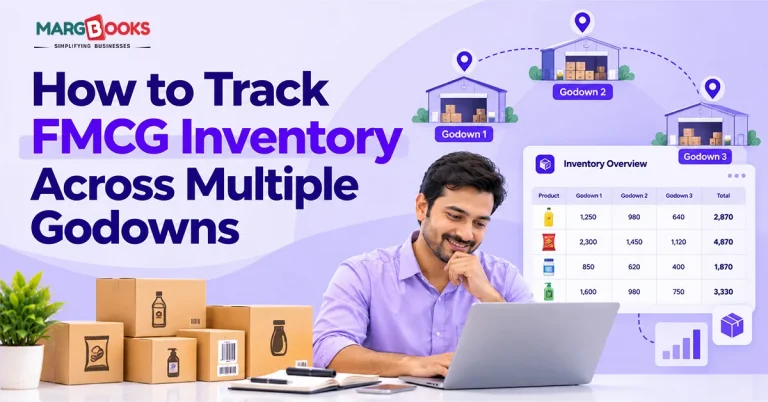
If you run an FMCG distributorship, you already know the feeling. The sales team says a particular biscuit SKU is available. The godown in the next town says it isn’t. The register says 40 cartons, the software says 25, and the supervisor swears he moved 15 last Tuesday. Somebody has to find the truth, and it usually takes half a day.
This occurs due to the fact that stock exists in several locations, and no records have been maintained. The positive news is that it can be solved. To handle FMCG items across various warehouses, it is necessary to have distinctive stock locations for each warehouse, track incoming, sold, and transferred products in that warehouse, keep track of product batches and expiry dates, as well as to maintain records of stocks for each warehouse. Cloud-based inventory management software keeps all godowns in sync in real time. In this guide, we cover why multi-godown tracking goes wrong, a seven-step method to set it up properly, the reports worth checking, and the mistakes we see distributors repeat again and again.
Why Multi-Godown Tracking Is Hard for FMCG Distributors
FMCG is a volume game. Margins are thin, products are fast-moving, and one distributor can handle more than hundreds of SKUs for different companies, not to mention two to three warehouses where the possibility of making a mistake increases manifold.
Here is where things usually not working in the right direction:
- Too many SKUs, too little discipline.
The same item gets entered under two slightly different names, and now you have two stock balances for one product.
- Batch, MRP and expiry differences
A shampoo sachet pack with a different MRP should not be treated as the same material, but an ordinary register may record it as a single line in the books.
- Transfers with no paper trail
Goods leave Godown A on a tempo and reach Godown B the next morning. If nobody records the movement on both ends, the stock is simply “missing” in between.
- Damage and returns that disappear
Damaged cartons and returned stock may be recorded in a notebook instead of being logged into the accounting system, hence creating no loss in the accounting records.
- Excel and registers going out of sync.
Two people updating two sheets is how duplicate and missing entries are born.

What Is a Godown in FMCG Inventory Management?
The term ‘godown’ in the FMCG Inventory industry refers to a storage facility where the merchandise is kept before it is sold or dispatched. In inventory software, a godown is a stock location. Every item you hold has a quantity in each location, and the total across all locations is your overall stock.
For example, suppose you have two godowns located in the same city: Godown A and Godown B. The inventory of each one, as well as the total inventory across both godowns, is properly maintained in the appropriate software. That is godown-wise tracking.
People frequently want to know how a godown differs from a warehouse or a branch. In business-speak in India, however, godown and warehouse are more or less synonymous. A branch is something different because it usually includes stock and also selling and billing. Your FMCG management software can enable you to set up either type of structure and group them by city or region as necessary.
7 Steps to Track FMCG Inventory Across Multiple Godowns
One can accomplish the goal by using efficient software and some experience in the process. The sequence is as follows-
1. Map your godown structure.
First of all, write down all locations and come up with logical and concise names (for example, “Noida Head Office,” or “Dadri Warehouse” instead of “Warehouse 2”). You may categorize locations according to the city-region principle if it makes report creation easier.
2. Standardise your item masters.
Next, assign a special code to each product, determine the unit of measure for each product, HSN code, and the RSP. Eliminate duplicates right away.
3. Record opening stock godown-wise.
Do a proper physical count in every godown before you start. Enter quantities batch by batch where possible. Now whatever you write down becomes the information base for putting together a unified database.
4. Post every transaction against a godown.
Purchases, sales, sales returns, purchase returns, and damage entries should all carry a godown. One important point to keep in mind: if any entry appears without a location, it will lead to trouble later on.
5. Use documented stock transfers.
Whenever goods move between godowns, make a transfer entry, with a quantity going out of the same quantity coming into the other. Never use a stock adjustment to fake a transfer. Adjustments hide movement, while transfers record it.
6. Track batch and expiry.
For fast-moving consumer goods which are perishable in nature (like packets of biscuits, packaged food, toiletries), you should ensure you keep track of the batch number and expiry date at the time of sale and then applythe FEFO strategy (first expired, first out). Create expiry alerts so that you are not surprised by the expiry dates.
7. Keep reconciling the physical stock with the stock recorded in the system.
Keep counting a few items every week instead of counting everything through the year. Compare physical stock with stock recorded in the system and find out the reason for discrepancy before correcting anything in the records.
A little note about the step: recalculation is not to correct the figure, but to find the cause in order to prevent the discrepancy in the future.
Key Reports to Review for Multi-Godown Control
Setting up the system is half the job. The other half is looking at the right reports often enough. These are the ones we would keep an eye on:
| Report | What it tells you | How often to check |
| Godown-wise stock summary | Quantity of each item in every godown | Daily or weekly |
| Batch and expiry report | Which batches are close to expiry and where they are sitting | Weekly, with a deeper monthly review |
| Stock transfer register | Every movement between godowns, with dates and quantities | Weekly |
| Low-stock and reorder report | Items nearing the reorder level in each location | Daily |
| Slow-moving and dead stock report | Products that have not sold in a long time | Monthly |
| Stock variance (physical vs system) | Differences found during cycle counts | After every count |
If you have made the decision to pick inventory management software, always opt for one that provides outputs directly from its system and does not require any field data to be exported to Excel.
Common Mistakes When Managing Multiple Godowns
Most distributors do not fail due to one major mistake. They slip because of several small habits. Watch out for these:
- Making use of adjustments as opposed to transfers – The process may seem faster, yet it disrupts the audit trail, causing both warehouses to appear flawed.
- No batch-level tracking- Without it, you cannot tell which lot is nearing expiry, and you will find out only when the stock is already unsellable.
- Delayed data entry – If entries are made two or three days late, your reports are always describing the past.
- Shared accounts and lack of access regulation- Use of a common username does not allow one to monitor who did what. Make sure to give every user unique access and limit the editing rights.
- Ignoring slow-moving stock in remote godowns- The godown you rarely visit is exactly where old stock quietly piles up.
Manual / Excel vs Software for Multi-Godown Tracking
Excel is fine when you have one godown and thirty products. It starts to hurt once you add locations, users, and batches. Here is a straightforward comparison:
| Factor | Manual / Excel | Inventory software |
| Real-time visibility | Only as current as the last update | Updates as each entry is made |
| Error rate | High, since every figure is typed by hand | Lower, because entries flow from billing |
| Expiry alerts | Needs manual checking | Alerts based on batch and expiry data |
| Transfer tracking | Easy to forget or mis-enter | Recorded as linked in and out entries |
| Multi-user access | Version conflicts and overwritten files | Controlled access for each user |
| GST integration | Separate work | Billing and GST in the same system |
| Mobile access | Limited | Cloud access from any device |
Best Practices Checklist
Here are the best practices :
- It is advisable to develop the practice of counting your high-turnover and high-value goods on a weekly basis.
- Make the habit of reviewing the stocks on a monthly basis that are about to be expired.
- Provide every employee with a unique login ID based on their job responsibilities.
- Have one central list of materials with no duplicates and misspelled words.
- Get a confirmation from the godown in-charge for every transfer receipt on the same day.
- Make transactions on the same day when transfers are carried out.
- Make a point to check your slow-moving report before placing your next order.
Conclusion
Multi-godown tracking rarely fails because the idea is hard. It doesn’t help that little practices tend to be forgotten along the way – entries made one day late, transactions claimed to be adjustments, batches not registered. Correct those errors, and most of the stock confusion is gone.
Start with small things: clearly label your godowns, sort the items list, and track each entry down to each location. Then, incorporate two practices that would pay for themselves fast in FMCG – batch and expiry tracking as well as weekly counting of the fast-moving stock. In a month or two, your phone would ring less from your sales team wondering if a certain product is available.
The right tool makes this easier, especially one that keeps billing, GST, and godown-wise stock in a single place. Cloud-based software applications like MargBooks allow the owner, accountant, and godown manager to see the same figures at the same time. Nonetheless, no software can solve the problem of late or incomplete entries, so the processes are just as important as the tools.
FAQs
Q1. What are the ways to manage different warehouses’ inventory?
One must create an inventory site for all warehouses and track all transfers, orders, sales, and stock availability at each site.
Q2. Will the software be able to make stock transfers from one warehouse to another?
Definitely. Good quality fast-moving consumer goods software records a transfer as stock leaving and arriving at different warehouses.
Q3. What actions will I take to eliminate waste due to expiry in fast-moving consumer goods business?
Control stock through monitoring batches with their expiry records. Use the FEFO technique and ensure that you also have an automatic expiry report system set up monthly, so that you will know what items are nearing expiry and either push or send them back within a set time frame.
Q4. What steps should be taken for physical stock to match the stock recorded by the system?
Cycle counts must be performed regularly, physical stock must be counted, and discrepancies must be analyzed and resolved based on each situation.
Q5. Are a warehouse and a godown the same?
In India, both warehouse and godown mean the same thing. A godown is said to be a place for storage of goods, while a warehouse can refer to the storage of goods as well as various logistics operations such as packing and dispatching.
Q6. Could I use cloud inventory software for multiple godowns?
Yes, because the cloud platforms are synchronized all the time and can be accessed from any device, thus providing the same information for the business owners and managers.
Q7. Is it possible to keep records of GST and manage inventories at multiple godowns in one software?
Yes, and that’s possible only if the software takes care of all accounting and warehouse operations without the need to enter data several times.

Aman Kannojia is the Digital Team Lead at MargBooks. He started out as an SEO Specialist and never lost his love for words. With 5 years of experience across banking, SaaS, and finance, both domestic and international, he brings strategy, leadership, and storytelling together. He doesn’t just manage a team, he builds one that creates.