Retail Software
 Distribution Software
 Retail Chain


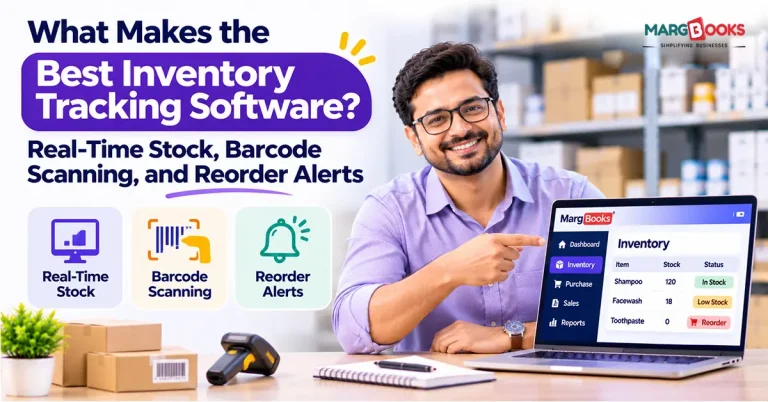
What Makes the Best Inventory Tracking Software? Real-Time Stock, Barcode Scanning, and Reorder Alerts

Just a few years ago, I saw an online store owner count a garage full of boxes all day Saturday. According to her spreadsheet, she should have had 43 units of her most popular candle. She had 31 of them on the shelf. Twelve people already bought something she doesn’t have.
This is how poor inventory tracking works. Not much is happening except for a few refund emails, a hasty reorder, and a Saturday with a notebook instead of relaxing. The best systems for managing inventory keep track of the stock using a real-time update process and barcode scanners to eliminate errors associated with data entry; besides, they remind the business owner to reorder when needed. It also needs to be scalable with your business and integrated with all your sales and financial tools. Now let’s analyze every component in detail.
What Is Inventory Tracking Software?
Inventory tracking software is a tool that monitors the products you own, where they are located, and the amount of product changing due to purchases, movements, sales, and returns. It is different from spreadsheets in that it works automatically and informs you when action is required.
Retailers, online businesses, restaurants, warehouses, and even small manufacturers make use of this software. This software is meant for anyone selling products whose inventory may not be accurate.
Why Real-Time Stock Tracking Matters
With real-time inventory tracking, you can be sure that your inventory levels will change in the same instant something changes, either by selling something, returning it, or receiving new supplies right at your doorstep.
The point is as follows. You sell jackets on your own site, on Amazon, and in a physical store. You have two of these jackets in stock. A customer buys a jacket from your shop at 2:00 pm. If you are updating your listings only at midnight, you may sell two more of those jackets online during this time.
Asking yourself these questions when analyzing the software will help:
What’s its syncing speed?
“Near real-time” could refer to anywhere between seconds and fifteen minutes. Ask for specifics.
Is it able to display stock by location?
It doesn’t matter that you have fifty pieces of stock if forty-eight are not in the right warehouse.
Is there any audit trail?
You need to know who did what when something doesn’t add up.

Barcode Scanning: Small Feature, Huge Difference
It is the typing of numbers on the screen where mistakes can enter. Transposing numbers, skipping lines, and “I’ll just change it later” cause trouble.
The barcoding process for inventory is as follows: scan the barcode; the system will recognize it as an appropriate SKU number and change the stock count instantly. This process takes about one second, without any typing at all.
A regular process of receiving goods is like this:
- Delivery comes.
- Each piece or case is scanned by you with your smartphone or scanning device.
- Each code is recognized by the software as a particular product.
- Stock is increased instantly, and the purchase order is finished.
Things you should verify before deciding:
Hardware requirements
Some applications give you the option to use your smartphone camera. It’s OK for smaller companies. When it comes to larger warehouses, it is advisable to opt for Bluetooth or specialized scanners. However, please make sure your software is compatible with the scanner.
Label generation and printing
Does it allow you to create and print barcodes for those products that lack them? UPC, EAN, and QR are the minimum ones it should support.
Batch, lot, and serial numbers
If you work with foods, cosmetic products, nutritional supplements, or electronic devices, then you probably will need it.
When you compare two billing software options and see that one of them has an awesome scanning application, whereas another one has a bad one, select the first one. Your employees will use it hundreds of times per week.
Reorder Alerts and Automated Replenishment
Stockouts cost you sales. Overstock ties up cash. Reorder alerts sit right between the two.
A reorder point is the stock level that triggers a new order. The formula is: (average daily sales × supplier lead time) + safety stock.
Here’s a worked example. Say you sell about 20 units a day, your supplier takes 7 days to deliver, and you want a buffer of 40 units for surprises.
(20 × 7) + 40 = 180 units
When stock drops to 180, it’s time to reorder. A good system does the math for you and pings you at that moment.
What to look for:
- Per-item thresholds. A flat “alert me at 10 units” rule doesn’t work when one product sells 5 a week, and another sells 500.
- Multiple alert channels. Email, text, and in-app notifications, so a warning doesn’t get buried.
- Automatic purchase orders. The better tools draft the PO and send it to your supplier for approval.
- Seasonality. If your sales spike in November, a static reorder point will fail you. Look for forecasting that accounts for it.
Other Features to Look For
After that trio of essentials is addressed, here are some factors that distinguish good software from great:
Integration: Having the ability to integrate the software with the store platform, POS software, and accounting program, along with APIs for other needs. Double entry makes automated inventory impossible.
Reporting: Find out the turnover, excess stock and ABC analysis to see the items which need either replenishment or going down by price.
Bundles and kits: If selling a bundle of five gifts, then when you sell one gift, you can not take only one piece off the stock records.
Transfer management: This is a tracked action rather than an estimate when transferring stock between locations.
Access via mobile and offline capabilities: Warehouse Wi-Fi is notoriously flaky.
User permissions: Your seasonal packing intern doesn’t need access to change purchase orders.
Onboarding and support: You want a person to talk to when you have a counting issue during your busy week.
Inventory Tracking Software Comparison Table
In the table below, we have given the differences between Inventory Tracking software features, why they matter, and what benefits they provide.
| Feature | Why it matters | What good looks like |
| Real-time sync | Prevents overselling | Updates across all channels within seconds |
| Barcode scanning | Cuts errors | Mobile app plus hardware support |
| Reorder alerts | Prevents stockouts | Custom thresholds per SKU |
| Integrations | Avoids double entry | Native connectors plus open API |
| Pricing | Controls total cost | Clear tiers, no surprise per-SKU fees |
Common Mistakes When Buying Inventory Software
Common Mistakes to take care of when Buying Inventory Software
- Choosing on price alone: The cheapest plan often lacks the integration you need, and you end up paying more to upgrade or switch tools.
- Ignoring integrations: If the software doesn’t talk to your store, you’re back to manual updates.
- Skipping training: The best tool fails when half your team keeps using the old spreadsheet “just in case.”
- Setting reorder points once and forgetting them: Sales patterns change. Review your thresholds every few months.
Conclusion
Here are three things that great inventory software does right: maintains your figures up-to-date in real time, makes counting easy with the help of scanning, and tells you when you’re about to run out of stuff. All other functionalities come as extras.
First off, start by taking free trials/demos and selecting those that best suit your way of doing business. MargBooks Software would be a good choice for Indian companies that need GST-compatible billing in addition to inventory management. Give it a try yourself and choose the one that will make the work easier for your team. The you from the future will thank you.
FAQs
Q1. Which inventory management software is most suitable for small businesses?
The right software is the one that matches your business size, sales channels, and budget. Often the best choices for small businesses are those that offer real-time syncing, barcode scanning through a smartphone, automatic reorder alerts, and integration with their point-of-sale software and accounting systems.
Q2. Does inventory software work with barcode scanners?
In many cases, yes. There are many POS systems that work with mobile phone cameras, Bluetooth barcode readers, and handheld devices. Always check what hardware your software solution will support before buying anything.
Q3. How does real-time inventory tracking work?
Every time a sale is made, a return is made, or incoming inventory is received, the inventory level will be updated immediately.
Q4. How do automatic reorder alerts work?
You establish a minimum number for each product. As soon as the amount goes below that amount, the program alerts you or creates a purchase order for you to replenish the deficient amount.
Q5. Can I monitor inventory from different locations?
Yes, if the program allows multi-location tracking, you will be able to see what is in stock at every warehouse, shop, or bin, because you will have an opportunity to track transfers there.
Q6. Are spreadsheets suitable for tracking?
Yes, for a few products with a single sales channel or store. After the introduction of more channels or locations, or over a few dozen items, spreadsheets become cumbersome and ineffective, and they cannot send warning signals for you.
Q7. What is the difference between inventory management and inventory tracking?
Tracking is about data gathering (what you have and where), while management is about data usage (forecasting, purchasing, and deciding how many products you need).

Aman Kannojia is the Digital Team Lead at MargBooks. He started out as an SEO Specialist and never lost his love for words. With 5 years of experience across banking, SaaS, and finance, both domestic and international, he brings strategy, leadership, and storytelling together. He doesn’t just manage a team, he builds one that creates.