Retail Software
 Distribution Software
 Retail Chain

How to Select Invoicing Software with GST Return Support

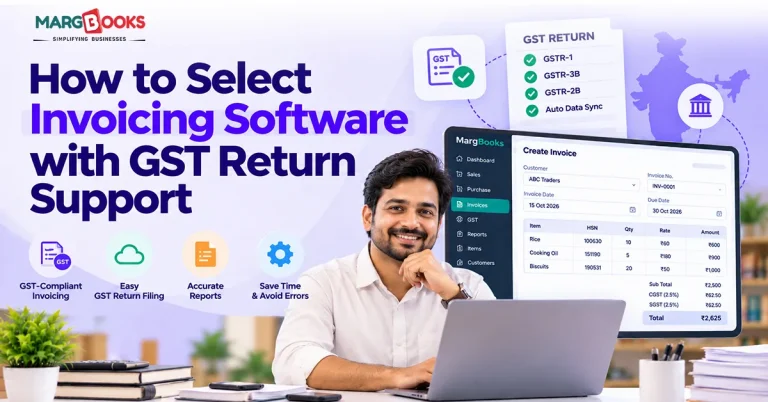
Imagine it’s the 18th of the month. You have a flood of invoices around you, an active spreadsheet, and an intimidating GSTR-1 closing coming up tomorrow. The invoice from the cloth supplier does not display the correct tax heading; another one does not show the GST number at all. You wonder if the credit note you’ve issued last week has made its way to the end of earnings.
This is when people start searching for GST-enabled invoicing solutions, and this is a good time to be honest about what you need because most websites will only go as far as saying their solution is GST compliant. That’s where the questions from this guide come in: where this phrase originated from and how it became so widely used in many applications.
What Is Invoicing Software with GST Support?
Invoicing software with GST support creates GST-compliant invoices, stores your sales and purchase records, and arranges that data so you can prepare returns from it. What each product does beyond that varies a lot, and actually filing a return may need extra steps, like a separate GST Portal login or an authorised integration. It helps to separate two ideas people often mix up.
A basic billing tool gives you an invoice with a total at the bottom. GST invoicing software understands GSTINs, place of supply, HSN or SAC codes, and whether a sale should carry CGST and SGST or IGST. It applies the tax logic for you and keeps everything in a structured form.
Then there’s the gap between preparing a return and filing one. Preparing means the software organises your data into reports or files that line up with what a return asks for. Filing means the return is submitted on the GST Portal. Some tools only do the first. Some connect to the portal through authorised providers. Don’t assume.
Why Do Businesses Need Invoicing Software with GST Return Support?
The cleanliness of a GST return is dependent on that of the invoices associated with it. If the source data remains unclean, it will become an expensive problem later, typically during the final two days leading up to the deadline.
Good Billing software ensures that you do not have to keep performing the same entry twice – once on your billing system and again on your GST return system. It also helps maintain stock and sales records. It applies tax rates consistently and allows you to verify calculations easily. The best software will notify you of any issues like a missing GSTIN number or mismatched percentages.
However, it is still important to remember that technology speeds up the process and identifies problems sooner, yet it cannot guarantee a flawless return.

Key Features to Check Before Selecting GST Invoicing Software
GST-compliant invoice generation
Begin your work here, as everything else hinges on this point. Create a couple of sample invoices, with one being an interstate sale and the other having multiple tax rates. Check the invoice number and GSTIN, as well as the required HSN or SAC codes and tax heads.
GSTR-1 data preparation and export
GSTR-1 is the form for reporting your outward supplies. Check what the output generated by your software is in the form of – a document, an export, or something else. The GST Portal can accept both online entries and offline JSON uploads, so verify whether or not the file you generate would be usable by the GST Portal.
GSTR-3B reporting support
GSTR-3B serves as an overview return, which provides the single glance overview of outward supplies, liability of tax, and the relevant figures. Before preparing the return, you need to compare the overview with your invoice-level data so that you can reconcile differences before filing.
Purchase invoice management and ITC reconciliation
This is why many products fall short. You will need to use purchase invoices and compare them with GSTR-2B, the auto-generated ITC statement. The assessment allows you to identify supplier invoices that have either not been reported or have been reported differently from your records. Whether you can avail that credit thereafter is an issue by itself according to the relevant compliance.
E-invoicing and IRN generation
In case e-invoicing is applicable in your case, make sure that the software can generate the IRN (Invoice Reference Number), handle the QR code, and work with the relevant portal. If e-invoicing regulations do not apply today, inquire about the condition for when these become relevant in the future. Check the current applicability by looking up the relevant data on the official portal, rather than relying on the vendor’s site.
Error flags and return reports
The issues listed above may seem trivial, but they are actually a big deal. Knowing about a problem on the fifth is much better than discovering it on the nineteenth.
Accounting integration, security and audit trails
Check the integration of the tool with your accounting system. Various aspects like user rights, history of transactions, and backups should also be checked. Additionally, you need to be sure that the data can easily be exported in case you should be required to do it.
How to Select the Right Invoicing Software with GST Return Support
Here are the steps to select the right Invoicing Software
First, write down what you actually file. Which returns, whether you reconcile purchases, whether e-invoicing applies. A single-GSTIN trader and a distributor with branches in three states need very different things, and a short written list stops you from being swayed by a long demo.
Second, get specific about GSTR-1 and GSTR-3B. Ask exactly which data, reports, and exports are included, and whether any filing functions come with it or whether you’ll still go to the portal yourself. Vague answers are an answer too.
Third, look at reconciliation. See how sales records, purchase invoices, credit notes, and amendments are treated, and how mismatches are shown to you.
Fourth, work out the real cost. The headline price rarely tells the whole story. Check whether GST modules cost extra, how many users each plan covers, and whether integrations, onboarding, or support are charged separately.
Fifth, think two years ahead. How many invoices will you raise then? Will you add users, branches, or another GST registration? A tool that fits today and breaks at double the volume isn’t a bargain.
Sixth, and this is the one people skip: test it. Use a trial or a demo with your own sample invoices. Raise a few sales, a credit note, and a purchase entry. Check the tax calculations, open the reports, try the export. Twenty minutes of this tells you more than any feature list.
GST Invoicing Software Comparison Checklist
Use this table when you compare vendors, and fill it in from their official information or your own trial. Not every product supports every row, and that’s the point of the exercise.
| What to check | What to look for |
| GST invoices | Correct tax fields, GSTIN, HSN/SAC, CGST/SGST/IGST logic |
| GSTR-1 | Reports, data preparation, export format |
| GSTR-3B | Tax summary reports and how they tie back to invoices |
| GSTR-2B | Purchase data comparison and ITC review support |
| E-invoicing | IRN and QR code workflow, if it applies to you |
| Amendments | Credit notes, debit notes and revised invoice data |
| Integrations | Accounting and GST-related workflows |
| Security | User permissions, backups, audit trail |
| Pricing | What’s included, user limits, extra charges |
Common Mistakes to Avoid When Choosing GST Invoicing Software
The most common error is to think that because an application can make GST invoices, it can also do GST returns. Sometimes it cannot do that, or it does so using a separate login or through an authorised integration that you need to know about and set up.
The next several errors are more subtle. Users purchase software without verifying if the export file is compatible with the GST Portal. They tend to postpone reconciliation until the first mismatch happens. They do not ask how credit notes and changes are processed, which is where things become messy. Users with several GST registrations forget to find out whether the application can work with several GSTINs properly.
Last but not least is the issue of pricing. Opting for the cheapest plan may turn out to be more expensive once you start adding necessary modules that you require.
If you are still evaluating options, it would be a good idea to learn about day-to-day invoicing managed by GST billing software or how various online invoice software fit into small business accounting systems.
Conclusion
When selecting invoicing software that includes GST return capabilities, you need to consider a number of important criteria. Firstly, you need to know whether it issues GST-compliant invoices. You need to ask whether the software can compile GSTR-1 and GSTR-3B data in the format that you require. You need to determine whether it can assist you in reconciling your purchases with GSTR-2B. You should also confirm whether or not it is suitable for businesses that have to deal with e-invoicing. Finally, you need to find out how much will be charged for the add-ons, support, and number of users.
Once you decide which software options deserve your attention, the next step is to test them against your invoices and check whether they comply with the stipulations on the GST Portal rather than focusing on the vendor’s website. The criteria that have been outlined earlier can be applied to any vendor in the same way. MargBooks Software is one of the platforms that ought to be subjected to such a test. Generate some sample sales invoices, generate a credit note and a purchase entry, and check out the GST reports and exports it produces. If what you get matches what your business files and reconciles every month, it means you have the answer. On the contrary, if the results don’t match, you can just take twenty minutes out of your time and figure out what exactly is important for you.
FAQs
Q1. What is invoicing software with GST return support?
The application that generates invoices compliant with GST and organizes sales as well as purchase data into reports or files useful for preparation of returns. In addition to that, some solutions also assist with reconciliation. Filing might require additional steps or approval, so ensure you check what’s on offer.
Q2. Which features should GST invoicing software have?
At the very least: GST-compliant invoices, as well as GSTR-1 and GSTR-3B reports, management of purchase records, error flags, e-invoicing support if applicable, user privileges, backups, and data export. What matters here is which tools would fit your business best depending on your size and the returns you file.
Q3. Can invoicing software automatically prepare GSTR-1?
Several applications are able to organize data on invoices issued for outward supplies into a GSTR-1 report or an export file. That said, it is always advisable to verify the data anyway before proceeding and check that the file extension is accepted by the GST Portal.
Q4. Does GST invoicing software also support GSTR-3B?
Some tools will generate a GSTR-3B summary that displays outward supplies and tax liabilities, while others won’t provide this. Contact the vendor to check what the report includes and compare it with the invoices you have during a trial.
Q5. What is the difference between GST invoice generation and GST return filing?
Invoice generation refers to the creation of a tax invoice, while return filing involves the submission of the return on the GST Portal. A tool can perform one of them, but that does not mean that it automatically does the second one as well. So, double-check exactly what service they provide you with.

Aman Kannojia is the Digital Team Lead at MargBooks. He started out as an SEO Specialist and never lost his love for words. With 5 years of experience across banking, SaaS, and finance, both domestic and international, he brings strategy, leadership, and storytelling together. He doesn’t just manage a team, he builds one that creates.