Retail Software
 Distribution Software
 Retail Chain

Why Are Tax Calculations Wrong on Business Invoices?

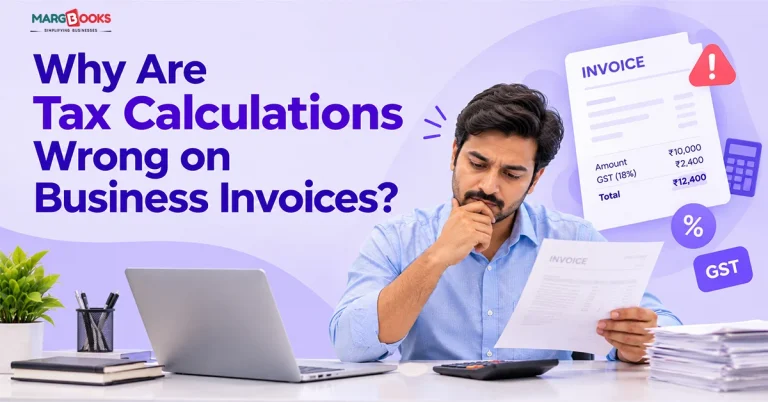
A few years ago, a distributor I know sent out about 300 invoices in a month. Roughly a dozen carried the wrong GST rate. Nobody noticed until his buyers started calling because their input tax credit didn’t match. For the next two weeks, he was busy issuing credit notes and offering apologies.
If you think this sounds practical, then you are not alone in the situation. Mistakes with tax calculations in business invoices are one of the common sources of billing troubles in India, which have nothing to do with carelessness. It all depends on the way invoices are created. This writing shares the reasons for mistakes, the costs, and solutions for fixing the issue.
What a correct tax calculation looks like
It is useful to first understand what “correct” looks like before proceeding to search for errors. Here are the steps involved:
- Start with the price of the item or service.
- Subtract any discount that’s shown on the invoice.
- The result is your taxable value.
- Apply the GST rate to the taxable value.
- Split the tax: CGST plus SGST if the sale is within the state, IGST if it crosses state lines.
- Add it up for the invoice total.
Say you sell an item for ₹10,000 at 18% GST, no discount. The tax is ₹1,800. Within the state, that shows up as ₹900 CGST and ₹900 SGST. To a buyer in another state, it’s ₹1,800 IGST. Same tax, different split.
It’s not complicated on paper. The trouble starts when you’re doing it 40 times a day, under pressure, with a customer waiting at the counter.
Seven reasons tax calculations go wrong
Here
1. The wrong tax rate gets applied
This is the big one. Rates differ by product, and they change. A person entering invoices from memory will, sooner or later, use 12% where it should be 18%, or the other way round. Nobody’s being lazy here. When you’ve typed the same rate for six months, your fingers keep typing it.
2. The HSN or SAC code is wrong
The rate follows the code. If the HSN code on an item is off, the rate attached to it is probably off too. And because the code is something you set up once and forget, the same mistake repeats on every invoice until someone catches it.
3. CGST/SGST and IGST get mixed up
The total tax might be correct while the split is wrong. That happens when the place of supply is entered incorrectly, say a customer with a registered address in one state but delivery in another. A wrong split can still cause mismatches when your buyer reconciles their returns.

4. Discounts are applied after tax
This one catches a lot of people. Take that same ₹10,000 item with a 10% discount. The right method is to take the discount first (taxable value becomes ₹9,000), then charge 18%, which is ₹1,620. Total: ₹10,620.
The wrong method is to charge tax on ₹10,000 (₹1,800), then subtract ₹1,000. Total: ₹10,800. You’ve just overcharged the customer by ₹180 and reported the wrong taxable value. Multiply that across a month of sales, and it gets ugly.
5. Rounding is inconsistent
Round each line item, or round only the final total? Different people do it differently, sometimes within the same business. The difference is usually a rupee or two. But a mismatch of even a rupee between your invoice and your return is exactly the sort of thing that shows up in reconciliation.
6. Manual input into Excel or paperwork
While spreadsheets are quite useful, this effectiveness can be compromised if someone accidentally fills in information too far down a row or mistakenly overwrites a cell with a number. As soon as this occurs and a formula is affected, you will not have any alerts telling you. Your spreadsheet will just give you an incorrect total without you noticing anything is wrong.
7. Old tax data nobody updated
When a rate changes or a new rule kicks in, someone has to update the master data. In a business without a clear owner for that, it simply doesn’t happen. Invoices keep going out on the old settings.
What wrong tax calculation can cost
The invoice looks fine on the day you send it. The damage shows up later.
Your buyer can lose or delay their input tax credit
Having an incorrect GSTIN, invoice amount, or GST amount, even if by a small amount, can be enough to get ITC rejected during reconciliation. Your customer’s money is involved and they will know who caused the trouble.
Your returns stop matching
What you report in GSTR-1 should line up with what your buyers see on their side. When it doesn’t, you’re explaining yourself.
There’s a compliance and penalty risk
Mistakes on an invoice that would lead to penalties come to light the second one errs over and over again. These policies and amounts have slight nuances, so check current provisions, or consult CA before relying on any figure. It eats time. Credit notes, revised invoices, awkward phone calls. None of it makes you money.
Already sent a wrong invoice? Here’s what to do
Don’t panic, and don’t just edit the original and hope. The appropriate fix depends largely on what exactly went wrong and when you found out about it:
- If you caught it before filing: You might be able to cancel the invoice and rewrite it within the time allowed by law.
- Already reported or the buyer has used it: you’ll usually need a credit note or debit note, and the correction has to be reflected properly in your return.
- Not sure which applies: that’s a question for your tax professional, because getting the correction itself wrong just stacks a second error on top of the first.
How billing software stops these errors before they happen
To be honest, you can really eliminate most of those errors through discipline: by using checklists, having second checks, and having a person responsible for checking rates. This works for some time. However, this really depends upon people not getting tired, rushed, or distracted – and that’s not a plan, only a hope. Good billing software removes the human step where the mistake happens. Rather than trusting someone to remember the rate, it pulls the rate from the item’s setup. Rather than asking a cashier to work out CGST versus IGST, it checks the place of supply and splits the tax itself. Some of the things a proper setup does for you:
- Calculates tax automatically from the item master and HSN/SAC code, so the number isn’t typed by hand.
- Applies discounts before tax, every time.
- Decides between CGST/SGST and IGST based on the customer and the place of supply.
- Stops you from saving an invoice with required details missing.
- Issues e-invoices (with IRN) as well as e-way bills from the same invoice, which eliminates data entry.
It seems like a small thing, but this is crucial. Every time a person has to manually input data from one program to another, there’s a chance to make a mistake.
Why invoice management software is bigger than invoice creation
Making one correct invoice is only half the job. The other half is what happens to it afterwards. Invoice management software treats the invoice as the start of a chain, not the end. A valid sales invoice allows for updating stock records, account balances, payment schedules, and GST reports. Purchases from suppliers can instead be uploaded, making data entry unnecessary. If the returns are prepared using the same invoices, this is not an issue because they are the same figures.
This approach is very different from the more traditional methods where an invoice is generated in one system, stock levels are kept in another program, and returns are calculated based on yet another piece of software.
Conclusion
Wrong tax on an invoice is rarely about a person being careless. It’s about a process that asks people to do careful arithmetic quickly, over and over, with no safety net. The fix is to take the arithmetic away from them. If you’re still doing invoices by hand or in a spreadsheet, try MargBooks and see how much of the checking disappears. Your next reconciliation will thank you.
FAQs
Can I correct a wrong GST amount after issuing an invoice?
Usually yes, but how depends on timing. You may cancel and reissue, or raise a credit or debit note, and the correction must be shown properly in your return. Ask your tax advisor if you’re unsure which route applies.
What happens if I charge the wrong GST rate?
Your credit rating can get impacted, and you might not get the returns you expect, along with some fines or penalties. The repercussions vary depending on the situation.
How does billing software compute GST?
The software gathers the tax rates and HSN/SAC code for each item and applies them to the taxable value. It then determines whether to charge CGST/SGST or IGST based on the supply location.
What distinguishes billing software from invoice management software?
The two technologies have much in common. While billing software concentrates on creating bills efficiently, invoice management software goes beyond that by tracking the processes of invoice preparation, payment receipt, overdue payments, and GST declaration.
Does MargBooks support e-invoicing?
Yes, it supports IRN generation and e-way bills, and a free trial is available. Check the page for current plan details.

Aman Kannojia is the Digital Team Lead at MargBooks. He started out as an SEO Specialist and never lost his love for words. With 5 years of experience across banking, SaaS, and finance, both domestic and international, he brings strategy, leadership, and storytelling together. He doesn’t just manage a team, he builds one that creates.