Retail Software
 Distribution Software
 Retail Chain

Manage Business Ledgers Without Manual Bookkeeping

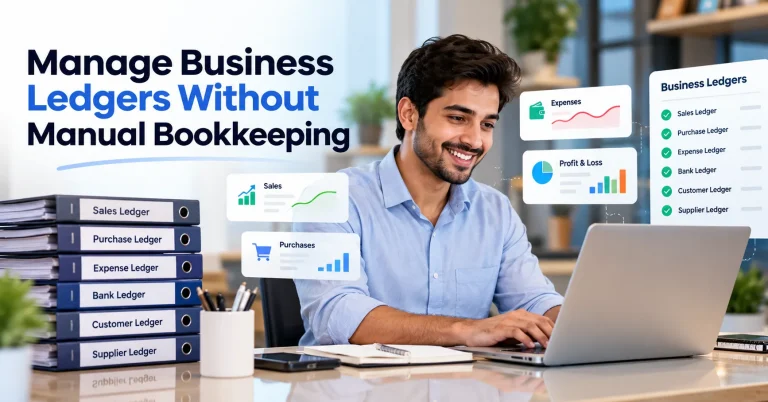
It’s closing time, and you’ve put down the shutter, but there you are still copying bills in the khata. The cash doesn’t tally with the books, and you just don’t know what’s wrong. This sounds very familiar to people who struggle with their accounting skills.
Well, that’s not very surprising because the problem is redundant writing. But the most advantageous aspect is that you won’t need to do bookkeeping manually. Among the latest options, some accounting programs allow recording each bill once and posting it to the right party’s ledger, as well as enabling you to create reports without effort. If you add GST software to this program, you’ll be able to calculate taxes automatically as well. This blog explains how it works and how to switch without disturbing your daily business.
What is manual bookkeeping, and why does it hold a business back?
Keeping records in a manual fashion is when one has to manually keying in each transaction into a book or enter it in an Excel sheet. A ledger refers to the khata of a single account. Your ledgers are your books of accounts. If the number of transactions is small, this is okay. But with the growth of business, problems arise.
Where do mistakes arise?
Here are some points on where mistakes arise.
- Mistakes in recording a sale in the wrong party’s khata.
- One bill being registered two times or not registered at all.
- A figure being copied wrongly from one page to another.
- A payment being received on UPI and not recorded.
- None of the above mistakes are put in front of you.
The trouble arises when you realize at a later stage that the totals are not matching, and you may have to go back to checking entries for a number of weeks.
What it secretly costs you
Mistakes your business continuously pays for
Getting time: It takes a few hours each week to check for discrepancies, enter data, and reconcile receipts.
Getting debts: In a situation where there are so many participants, it becomes almost impossible to tell who owes you money now and for how long. Blocked cash flows are detrimental to your business.
GST refund: If your purchase receipts accumulate dust at the bottom of your drawer, you may miss out on some of them and pay tax you could get a credit for.
Outdated information: Having two weeks’ worth of data does not tell you about your cash, accounts payable, or profits for today.

How does accounting software handle your ledgers?
In this section, we are talking about how accounting software handles ledgers.
Self-posting
Once the sales invoice is created, the system makes simultaneous adjustments to the customer’s ledger, your sales amount, and tax accounts.
Billing posts payments
It is possible to record a payment once the customer has made the payment. When this is done, the owed amount decreases, lending transparency to past-due bills.
Automated bank postings
Rather than having to compare your bank statement to your ledgers, you can instead upload your bank statement, which will automatically match transactions for you. You will only need to verify a couple of payments that don’t reconcile with your bank statement.
Reports prepared
Your current accounts receivable and payable report indicates who owes you and who you owe money to. Your accounting software also prepares and updates other reports like—
- Trial balance
- Profit and loss statement
- Balance sheet
All of these reports show your real-time position, not last month’s position.
Why is GST billing software central to automated ledgers?
GST billing software generates proper GST invoices. Accounting software goes beyond that. This means that the programs work with one another; when the invoices are generated by one, they go into the books without any additional input.
Things that a connected system can do for GST:
Here are a few pointers on what a connected system can do for GST-
- Picks the right tax.
For an invoice issued within the same state, you will use CGST and SGST. For a transaction with another state, IGST will apply. The software will intelligently determine which one of the taxes to use based on the nature of the transaction.
- Creates a complete invoice.
GSTIN, HSN/SAC code, tax rate, and amounts will appear in the proper format for invoicing.
- Includes e-invoicing and e-way bills.
Your invoices will be able to generate these documents automatically without any need to enter the data into the government portal.
- Prepares data for the returns.
All the sales and purchase data is already available for GSTR-1 and GSTR-3B filing.
How to move from manual ledgers to automated bookkeeping
You do not need to shut your shop for a week. Here is a step-by-step guide on how to move from manual ledgers to automated bookkeeping.
How to move from manual ledgers to automated bookkeeping
- Look at what you have: List your parties, items, and accounts. Remove the old ones you no longer deal with.
- Choose the right software: Pick one that gives both accounting and GST billing, so you avoid moving data between two tools.
- Enter opening balances: Use your last closing figures. Most tools allow upload from Excel.
- Add parties and items: This can also be uploaded from Excel.
- Connect or upload your bank statement: This is where a lot of time is saved.
- Set up your invoice: Add your shop name, address, GSTIN, bank details, and logo.
- Run both systems for one month: Write in the old khata and enter the same bills in the software. At month-end, match the totals. When they agree, you can let go of the old method.
Ask your CA to look at the first month’s reports. It takes little time and gives you confidence.
What features should you look for in accounting software?
In the table below, we have given reasons behind certain features to look for while choosing the best accounting software for your business-
| Feature | Why it matters |
| GST billing and return data | Correct invoices and figures ready for GSTR-1 and GSTR-3B |
| Bank reconciliation | Saves hours of tallying |
| Party-wise outstanding | Shows who owes you and for how long |
| Inventory tracking | Needed if you sell goods |
| User permissions | Staff see only what they should |
| Mobile access | Make bills and check dues from anywhere |
| Cloud backup | Your data stays safe if a computer fails |
| Clear reports | You understand them without an accountant explaining |
| Support in your language | Help is easy to get when you are stuck |
Always take a free trial and test with your own real bills, not demo data.
Conclusion
Hand-written khata has served Indian businesses for generations, and there is no shame in having used it. But a business that is growing needs more bills, more parties, more GST entries, and more payments to track. At some point, the register stops helping and starts taking your evenings.
Accounting software with GST billing changes that routine. You make a bill once, and it goes into the right party’s ledger with the correct GST. Payments are recorded against bills, so you can see who owes you money and for how long. Bank entries are matched with far less effort, and your reports are ready when you need them, not after a long month-end sitting. You also get time back, and that is hard to put a price on.
If you are looking for a tool built around exactly this kind of work, Margbooks Software is one to try. It brings accounting and GST billing into one place, so your invoices, ledgers, and reports stay connected instead of living in separate files. Take a free trial and test it with your own real bills, not sample data, to see whether it suits the way your shop or firm works.
FAQs
Q1. What qualifies as a ledger in business?
A ledger defines the account of transactions for a customer, provider, or a bank. All ledgers form part of the books of accounts.
Q2. Can bookkeeping be carried out fully electronically?
For daily entries, nearly yes. There will still be a need for reviewing reports and making adjustments, but the routine writing will be eliminated.
Q3. Is GST billing software different from conventional accounting software?
Definitely. GST billing software can create invoices that comply with GST rules. On the other hand, accounting software performs the function of maintaining ledgers, monitoring expenses and receipts, and generating financial reports, with many solutions performing both functions.
Q4. How does software cut down on errors in the ledger?
There is only one entry for each transaction, and those transactions are automatically sent to the correct account, allowing for fewer transcriptions. Many applications will also alert you to any duplications in your entries.
Q5. Can I transfer my previous records from Excel or Tally?
Most accounting applications can transfer the supplier and product data as well as opening balances from Excel. Consult the user manual of the application you choose to confirm.
Q6. Is cloud accounting secure?
The answer is usually yes if you are working with a reliable provider. Check the level of password protection, 2-factor authorization, routine backups, and access levels for employees of your provider.
Q7. What is the timeframe to switch to the new system?
Usually, small businesses can switch over within a few days and be settled in a month of using both systems. Bigger companies with longer histories would require a longer timeframe.
Q8. Do I need an accountant after switching?
Yes, you still need an accountant to advise, file tax returns, and do year-end work. The difference is that now the accountant will rather spend more time on advising than correcting the data.
Q9. Is it allowed to maintain books electronically?
Yes, accounts can be maintained electronically, provided that you have necessary backups and keep records for the length of time prescribed by the law.

Aman Kannojia is the Digital Team Lead at MargBooks. He started out as an SEO Specialist and never lost his love for words. With 5 years of experience across banking, SaaS, and finance, both domestic and international, he brings strategy, leadership, and storytelling together. He doesn’t just manage a team, he builds one that creates.