Retail Software
 Distribution Software
 Retail Chain

Invoice Aging Reports: Meaning, Types, and How to Use Them

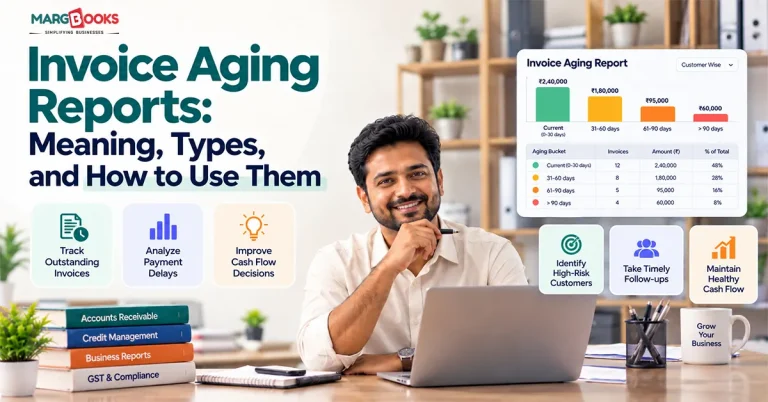
In most cases, business failures aren’t linked to inadequate sales levels. The problem is the cash customers owe, and that sits in someone else’s bank, as an invoice aging report shows.
By definition, an invoice aging report is a detailed record of overdue invoices according to the overdue period, allowing you to determine the period of overdue payments. The present article will explain what it is about, what its types are, what the meaning of buckets is, and how to read and create this report.
An accounts receivable aging report is a finance report that divides past-due invoices of clients according to the overdue period. In this report, the reflection of the past-due invoices takes place in sections such as current, 1-30, 31-60, 61-90, and more than 90 days overdue. This report helps businesses manage overdue payments and calculate the amount of cash flow lost because of debts.
What Is an Invoice Aging Report?
An invoice aging report gives you a look at who owes you money and how long it is overdue. Each unpaid invoice falls into one of a number of categories according to age.
It is also commonly referred to as an accounts receivable aging report. The difference between the two names is in how the information is being presented. The invoice report presents the data at the invoice level, while an accounts receivable report looks at unpaid invoices from a customer perspective.
Why businesses use it
Several reasons remain important:
- It shows which clients require a push and which need a phone call.
- It reduces cash forecasting to less than a guess.
- It identifies credit risk before a small delay leads to a write-off.
- It helps to prove the estimation of bad debts, which is required by accountants and auditors.
Who uses it
AR clerks make use of this information on a daily basis. Controllers and CFOs review it monthly. The owners of small businesses tend to consult it whenever they are experiencing cash problems or don’t understand where the money has gone. Lastly, lenders and investors occasionally require it as well, as it provides valuable insight about the situation concerning your revenues.
Types of Invoice Aging Reports
Not every aging report answers the same question. Here are the common versions.
| Type | What it tracks | Who uses it | Main purpose |
| AR aging report | Money customers owe you | AR team, owner, CFO | Collections and cash flow |
| AP aging report | Money you owe vendors | AP team, finance | Paying on time, managing cash out |
| Summary aging report | Totals by customer or bucket | Management | Quick health check |
| Detailed aging report | Every invoice with dates and amounts | Collectors, accountants | Follow-up and reconciliation |
AR vs. AP aging
The AR version looks at what is coming in. The AP version looks at what is going out. The math is identical; only the direction changes.
Summary vs. detailed
The summary tells you there is a problem. The detailed report tells you which invoice is causing it.
Due date vs. invoice date
This one trips people up. Aging by invoice date counts days since you issued the invoice. Aging by due date counts days since payment was actually expected. If you offer net 30 terms, an invoice that is 25 days old is not late at all. For collections work, aging by due date is almost always the more useful view.

Understanding Aging Buckets
Aging buckets are the time ranges used to group unpaid invoices. The standard setup uses 30-day intervals, which lines up with the most common payment terms.
| Bucket | What it means | Typical action |
| Current | Not yet due | Monitor |
| 1-30 days | Slightly overdue | Friendly reminder |
| 31-60 days | Overdue | Follow-up call, formal notice |
| 61-90 days | Seriously overdue | Escalate, consider pausing credit |
| 90+ days | At risk of write-off | Collections agency or legal review |
The longer an invoice sits, the lower the odds you collect it. That is the whole logic behind the table above.
Customizing buckets for your terms
Thirty-day buckets are a starting point, not a rule. If you run net 15 terms, tighter buckets (1-15, 16-30, and so on) will catch problems sooner. If you sell to large enterprises that routinely pay in 60 days, you may want wider ranges so the report isn’t permanently red.
Invoice Aging Report Example
Here is a simple example as of the end of a month.
| Customer | Current | 1-30 | 31-60 | 61-90 | 90+ | Total |
| Alder Supply | $4,200 | $0 | $0 | $0 | $0 | $4,200 |
| Birch Design Co. | $2,000 | $1,500 | $0 | $0 | $0 | $3,500 |
| Cobalt Logistics | $0 | $3,000 | $2,800 | $0 | $0 | $5,800 |
| Delta Foods | $1,200 | $0 | $0 | $4,500 | $0 | $5,700 |
| Everett & Sons | $0 | $0 | $0 | $1,000 | $3,600 | $4,600 |
| Total | $7,400 | $4,500 | $2,800 | $5,500 | $3,600 | $23,800 |
| % of total | 31% | 19% | 12% | 23% | 15% | 100% |
What does this tell us? Roughly 69% of the balance is overdue, which is high. Alder Supply is fine. Cobalt is drifting and worth a call now. Delta Foods and Everett & Sons are the real concern: together they hold $9,100 that is more than 60 days late, and Everett’s $3,600 has already crossed 90 days. That is the value of the Invoice aging report. In about ten seconds, you know where to look.
How to Read an Invoice Aging Report
Start with the share of your balance that is more than 30 and 60 days overdue, then drill into the customers behind those numbers. Here are the steps on how to read Invoice aging report from the billing software.
Step 1: Check the total. How much is outstanding in all? Compare it to last month.
Step 2: Look at bucket percentages. A healthy report has most of the balance in current and 1-30. If the 61-90 and 90+ columns are growing month over month, collections are slipping.
Step 3: Find the large overdue accounts. A single $20,000 invoice at 75 days matters more than ten $200 invoices at 40.
Step 4: Spot repeat late payers. If the same names show up in the older buckets every month, the issue is the customer, not the invoice.
Step 5: Review credit limits and terms. Customers who regularly pay late may need shorter terms, deposits, or a lower credit limit.
Warning signs
- The 60+ buckets grow for two or three months in a row.
- One customer makes up a big share of your overdue balance.
- Disputed invoices sit untouched.
- Older invoices keep getting partial payments that never clear them.
How to Use an Invoice Aging Report to Improve Cash Flow
Reading the report using invoice management software is half the job. Acting on it is where cash actually shows up. Here are a few ways on how to use an invoice aging report to improve cash flow.
Prioritize by age and amount. Work from the oldest and largest invoices down. Those are the ones most likely to disappear.
Set up reminders. A polite email a few days before the due date, another on the due date, and a firmer one a week later solves a surprising number of late payments. Many AR tools can send these automatically, which saves your team hours.
Adjust credit terms. If a customer is consistently 45 days late, stop extending the same terms. Ask for a deposit or move them to prepayment.
Forecast cash. Apply a realistic collection rate to each bucket. Maybe you collect 98% of current invoices but only 70% of those over 60 days. That gives you a far better forecast than assuming everything arrives on time.
Estimate bad debt. Accountants often use the aging method for the allowance for doubtful accounts. You assign a percentage to each bucket, based on past experience, and multiply.
Using the example above with sample percentages:
| Bucket | Balance | Estimated uncollectible | Allowance |
| Current | $7,400 | 1% | $74 |
| 1-30 | $4,500 | 3% | $135 |
| 31-60 | $2,800 | 10% | $280 |
| 61-90 | $5,500 | 25% | $1,375 |
| 90+ | $3,600 | 50% | $1,800 |
| Total | $23,800 | $3,664 |
Track DSO next to it. Days sales outstanding tells you the average time it takes to collect. The aging report shows you where the delay lives. Together they give a full picture.
How to Create an Invoice Aging Report
There are three practical ways, depending on how much volume you have.
Method 1: Your accounting software
Accounting Software such as MargBooks includes an aging report. You will usually find it under Reports, in the Accounts Receivable section, often named “A/R Aging Summary” or “A/R Aging Detail.” Pick the date, choose whether to age by due date or invoice date, and run it.
Method 2: Excel or Google Sheets
If you are working from a list of invoices, add a column that calculates days past due:
=TODAY()-DueDate
Then use an IF formula or a pivot table to sort each row into a bucket. A simple nested IF might return “Current” when the result is zero or below, “1-30” when it is 30 or below, and so on. It works, but it takes upkeep, and it goes stale the moment someone pays an invoice.
Method 3: AR automation software
Dedicated tools pull invoices from your accounting system, update the aging in real time, and trigger reminders on their own. This is the better route once you have more than a few dozen open invoices.
| Manual (Excel) | Automated | |
| Accuracy | Depends on data entry | High, synced to source |
| Time spent | Hours per month | Minutes |
| Real-time view | No | Yes |
| Scales with growth | Poorly | Well |
Best Practices
- Run the report weekly, and always before month-end close.
- Reconcile it with your general ledger so the totals match.
- Segment by customer type, region, or salesperson to see patterns.
- Give every overdue account one owner.
- Write down each collection attempt and every dispute reason.
- Set a target, such as keeping the 90+ bucket below 5% of total receivables, and review it regularly.
Common Mistakes to Avoid
- Aging by invoice date when terms are based on due date. It makes on-time customers look late.
- Ignoring unapplied payments and credit memos. They inflate balances and send collectors chasing money that was already paid.
- Treating every overdue invoice the same. A $50 invoice and a $50,000 invoice need different levels of attention.
- Checking it too rarely. A monthly glance leaves problems to grow for weeks.
- Looking but not acting. The report only helps if someone follows up.
Aging Report vs. Related Reports
Here we have given the differences between the aging report and other related reports.
| Report | How it differs |
| AR aging vs. AP aging | One tracks money owed to you, the other money you owe |
| Aging report vs. DSO | Aging shows where invoices are stuck; DSO gives one average number |
| Aging report vs. AR turnover | Turnover measures how often you collect receivables in a period; aging breaks balances down by age |
| Aging report vs. customer statement | A statement goes to the customer; an aging report is for internal use |
Conclusion
The purpose of an aging report is to go from a lengthy and tedious list of unpaid invoices to a concise list of decisions to be made. The aging report reveals who is overdue on payments, how far behind they are, and the extent of the payment due so that the collection effort gets aimed at those invoices that are most worthy of collection effort as opposed to those that are just the noisier ones. Aging by due date is indicated in this report, which should be studied weekly, with particular emphasis put on outstanding balances that are both large and older than usual as well. After that, the information has to be actioned, which means notifications about overdue payments, stricter credit policy, as well as reasonable predictions about bad debts to be anticipated.
Spreadsheets can be used for this purpose at the beginning, but the minute a payment hits, they become outdated. The necessity of using billing software becomes clear when more and more invoices need to be created. With the help of invoicing and payments, programs such as MargBooks can effectively create aging reports and make sure that the information is current.
FAQs
Q1. What is an invoice aging report?
An aging accounts receivable report categorizes unpaid invoices according to how long they have been outstanding. Organizations utilize this report to keep track of overdue payments, determine collection priorities, and project cash flow.
Q2. What is the difference between an AR aging report and an AP aging report?
An AR aging report sheds light on money customers owe to an organization, while an AP aging report provides information on the money owed by the organization. Both of the reports have a similar structure, but they show different sides of the cash flow.
Q3. What are the standard aging buckets?
The report usually has five categories, which are: current, 1-30 days, 31-60 days, 61-90 days, and 90+ days. However, it can be customized according to an organization’s payment terms.
Q4. How often should I run an invoice aging report?
Conducting follow-ups on your receivables weekly is the best practice; at the very least, once a month before closing the month’s accounts. Companies with large volumes of invoices may even check their receivables every day.
Q5. What is a good percentage for the 90+ bucket?
There is no straightforward answer to this question, as finance departments have different goals. However, many of them aim to have zero or at least single-digit balances that are over 90 days outstanding as a percentage of the whole accounts receivable amount.
Q6. How do you calculate invoice aging?
In order to calculate the period of time an invoice has been outstanding, you need to find the period from the invoice date to the report date.
Q7. How is an aging report used to estimate bad debt?
The first step is to find the percentage of identified uncollectables for each category based on the previous experience and total them up.
Q8. Can I create an invoice aging report in Excel?
Absolutely! Just prepare the list of your invoices, calculate the due date using the formula = TODAY ()-Due date, and bucket the invoices using the IF function or a pivot table.

Aman Kannojia is the Digital Team Lead at MargBooks. He started out as an SEO Specialist and never lost his love for words. With 5 years of experience across banking, SaaS, and finance, both domestic and international, he brings strategy, leadership, and storytelling together. He doesn’t just manage a team, he builds one that creates.