
 Retail Software
 Distribution Software
 Retail Chain


What Is an Inventory Monitoring System and How Does It Prevent Stockouts?

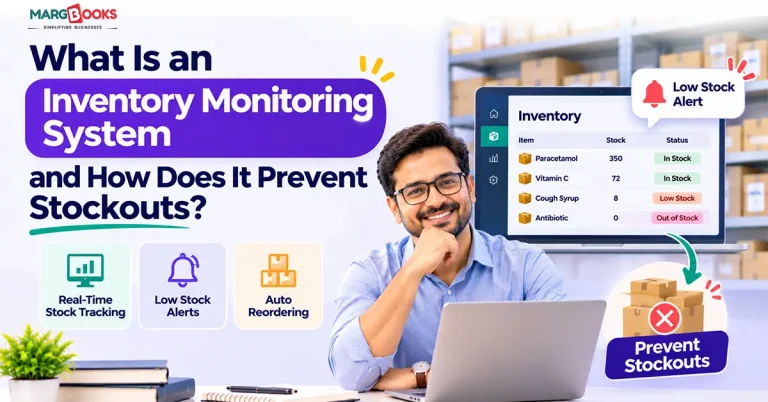
You are familiar with the experience. A consumer desires your most successful product, but there is nothing on your shelf. Or, even more troublesome, your website states that the product is available, the customer pays for the order, and two days later you are forced to send the customer an apology message.
Running out of stock results in losing not only a sale today but also the customer tomorrow. One of the easiest solutions for preventing stockouts is an inventory tracking system. In this post, we are going to explain what it is, how it works, and what it does to prevent stockouts.
What Is an Inventory Monitoring System?
An inventory tracking system combines both software and hardware components like barcode readers, RFID tags, and smart shelf sensors to keep track of your inventory in real time. It informs you when your stock runs low so that you know to reorder before any items are out of stock and to avoid any excess inventory issues.
It basically serves as a real-time dashboard for your stock. It is updated automatically after every sale, return, delivery, and transfer, so there is no more guessing about your stock.
They are frequently used by retailers, e-commerce sellers, manufacturers, warehouses, restaurants, and medical centers. While different products may be used, it is necessary for clients to know what they have in stock.
Inventory Monitoring vs. Inventory Management
Here is a table showing the difference between Inventory Monitoring and Inventory Management.
| Inventory monitoring | Inventory management | |
| Focus | Seeing what you have, where, right now | Deciding what to buy, store, and ship |
| Core job | Tracking and alerting | Planning, purchasing, forecasting, fulfillment |
| Typical output | Live stock counts, low-stock alerts | Purchase orders, demand plans, replenishment strategy |
| Example | “Only 12 units of SKU 4471 left” | “Order 200 more from Supplier B by Friday” |
Monitoring is the foundation. Management is what you build on it. Most modern tools do both, but if your data isn’t accurate and current, the decisions that follow won’t be either.
How Does an Inventory Monitoring System Work?
The inventory control system operates in the following way:
- Collect data: Barcodes, RFID readers, sensors, and your POS system keep track of each movement of inventory.
- Centralize: The data is synchronized in one database, which is usually in the cloud.
- Application of rules: The inventory control system matches current stock with the minimum threshold and safety stock.
- Notify or take action: According to the system, anytime the stock level drops below the predetermined limit, an alert or a purchase order is generated.
- Reporting: The dashboards indicate trends, best-selling products, slow-moving ones, and problematic items.
That’s the whole process. The key point is that it allows much faster implementation of the system than a human being could ever do it using a spreadsheet before.
The Technology Behind It
- Barcode and QR scanning: Cheap, familiar, and good enough for most small and mid-sized businesses.
- RFID: Tags are read from a distance and in bulk, so you can count a pallet without opening it. It costs more but saves a lot of labor at scale.
- IoT and smart shelves: Weight sensors notice when a bin gets light and report it on their own.
- Cloud software and integrations: Connections to your ecommerce store, POS, accounting software, or ERP keep every system looking at the same numbers.
What Is a Stockout, and Why Does It Matter?
A stockout occurs when a product is not in stock at the moment a consumer wants to make a purchase.
A stockout can be classified into:
Demand-related: An increase in purchases happened faster than expected, maybe due to a viral tweet or a hot weather spell.
Supply-related: A vendor was delayed, or a shipment was stuck, or the order was not large enough.
Data-related: Your records showed you had products in stock, but your shelves were empty. This occurs due to counting mistakes, theft, and damage more than is commonly believed.
The problem is bigger than simply losing a sale. Customers who are unable to locate their desired products tend to buy from competitors and do not come back. When stockouts happen online, they adversely affect the ranking at the marketplace, since the platforms always prefer sellers with available stock. Often, it leads to an additional cost of rush delivery after the occurrence.
How Does an Inventory Monitoring System Prevent Stockouts?
By providing you with correct and up-to-date figures and sending notifications in time to take action, it is able to avoid stock shortages. More precisely, it helps monitor stock levels in real time, initiates alerts based on the reorder points, calculates safety stock, identifies demand trends, prepares reports on suppliers’ lead times, and minimizes inaccuracies in counting. Below is an explanation of the importance of each factor.
Real-Time Visibility Across Locations
When you have a retail space, a storeroom, and an eCommerce store, you have different locations where you keep your inventory. One location might have a surplus of 40 units while another runs out of stock.
A monitoring system provides information in all locations. This way you have the right information at your disposal and can transfer the stock instead of placing a new order or stopping the sale of an item due to stock run-out.
Automated Low-Stock Alerts and Reorder Points
This is the feature that is widely purchased. You establish a threshold level for each item. When the level is reached, you receive a notification, or a purchase order is automatically raised without having to physically remember it.
A simple formula applies:
Reorder point = (average sales per day in units × number of days of lead time) + buffer stock.
For example: assume the daily sales of the product average 20 units, and the delivery time with the supplier is 5 days. You will require 100 units – based on sales. Add 30 units of buffer stock, and this will give you a reorder point of 130. Once you reach this count, you can place an order.
Safety Stock Calculations
Safety stock acts as a safety net for unforeseen emergencies regardless of whether it’s a delayed shipment or a sudden surge of demand. Good software programs take the real variance of sales and delivery into account so that supplies can be estimated based on current available data rather than the number defined by someone years ago. Too little safety stock means you will be out of stock too soon, while too much inventory means cash is just sitting on the shelves.
Demand Forecasting and Trend Analysis
Sales analysis can provide useful insights such as the fact that certain products double their sales every November or that one item runs out two weeks after a major promotion. Modern-day monitoring programs will help you identify these patterns in order to make purchase decisions ahead of time instead of relying on intuition.
Supplier Lead Time Tracking
Vendors report an average lead time of five days, but at times it could be as much as eight days. When the system tracks the actual time taken for a purchase order to arrive at your premises, you can better determine your reorder levels. The process will also tell you which vendor is contemptible, which will help during your next discussion.
Fewer Counting Errors and Shrinkage
Over a period of time, manual counting fails. Products can be incorrectly counted, lost, damaged, or stolen; thus, your data becomes inconsistent with reality. By recording numbers through scanning, one can eliminate discrepancies in figures.
Key Features to Look For
Not all tools cater to every enterprise. While evaluating features, check:
- Synchronization of several locations
- Notification levels per product, category, and location.
- Automatic ordering and issue of purchase orders.
- Exact reports and valuable data.
- Linkage with the shop, POS, accounting software, and ERP.
- Mobile application for receiving and counting goods
- Charges and installation according to the company size.
If you are a small business owner, avoid buying more than needed. A tool that works for your business is better than one collecting dust on the shelf.
Benefits Beyond Preventing Stockouts
When your numbers turn out to be dependable, other aspects become less problematic:
- Reduced surplus: You stock what you require rather than what you anticipated needing.
- Improved cash flow: Your cash is not stuck in stationary stock.
- Better supplier relations: Your orders are timely rather than rushed.
- Quicker deliveries: You know where to find your stock.
- Accurate bookkeeping: Your inventory reflects what is on your premises.
How to Implement an Inventory Monitoring System
Let us have a look at how you review stock today.
- Try to find where the game changes: late restocks, incorrect counts, or unconnected platforms.
- Set your limits: Pick reorder levels and safety stock for your key items, and do not try to fit them all in from the very start.
- Choose a good tool: Make sure that it suits your size, funds, and current platforms.
- Prepare your product information: Correct duplicate SKUs, missing barcodes, and inconsistent names before the import.
- Link sales channels and vendors: The more automatic, the fewer mistakes.
- Train your team: The best system fails if the people do not do the scan.
- Analyze the results: Evaluate the outcomes every month, and correct the limits according to your needs.
KPIs Worth Tracking
Here are the KPIs that are worth tracking while managing the inventory.
- Stockout rate: how often items are unavailable
- Fill rate: the share of orders you can ship complete
- Inventory turnover: how fast stock sells through
- Days of inventory on hand: how long current stock will last
- Carrying cost: what it costs to hold inventory
- Forecast accuracy: how close your predictions come to actual sales
Common Mistakes to Avoid
Below are some of the common mistakes to avoid while using the inventory monitoring system.
- Setting reorder points once and forgetting them: Demand changes, so your thresholds should too.
- Trusting quoted lead times: Use the real ones.
- Skipping data cleanup: Messy inputs mean unreliable alerts.
- Leaving a sales channel unconnected: One disconnected marketplace can oversell your stock.
- Turning on every alert. If your phone buzzes 50 times a day, you’ll start ignoring them all. Reserve alerts for what matters.
Conclusion
An inventory monitoring system doesn’t make products appear out of thin air. It makes sure you know what you have, see problems coming, and order at the right moment. Live visibility, smart reorder points, sensible safety stock, and cleaner data do most of the work.
Start small. Pick your top 20 products, set real thresholds, and see what changes. Once you see how much easier it is to stay stocked, you’ll want it everywhere. A tool like MargBooks Software can help you get there, keeping your stock counts and your books working from the same numbers.
FAQs
Q1. What is the main purpose of an inventory monitoring system?
The primary goal of this is to provide you with an instant and correct overview of your inventory so that orders can be placed without delay. This implies fewer occasions when goods are out of stock and there is less overstock as well as reduced surprises when clients place orders.
Q2. How does real-time inventory tracking reduce stockouts?
Every sale, return, and delivery changes your inventory numbers at once. You are notified when the low reserve is hit as it happens and can place orders or rearrange goods back on the shelves before they run out, instead of getting miserable when customers make complaints.
Q3. What’s the difference between inventory monitoring and inventory management?
Monitoring helps businesses keep track of their assets and their locations. Management highlights broader aspects like when to buy and from whom, while monitoring supplies the required information for making relevant decisions.
Q4. How much does an inventory monitoring system cost?
Prices vary. For a small business, an entry-level cloud solution may be purchased for dozens of dollars a month, whereas RFID solutions that large companies use can cost significantly more. The price is determined by the volume of SKUs to monitor, the number of locations, the needed hardware, and the specifics of integrations.
Q5. Can small businesses benefit from one?
Yes. Small businesses tend to feel stockouts most severely because their financial resources for mistakes are smaller. Even a simple solution that will include a barcode reader and low-stock notification may help save a lot of time and avoid losses.
Q6. What is a reorder point and how is it calculated?
A reorder point refers to a specific level of inventory indicating that it is time to order more stock. It can be calculated as average daily sales multiplied by supplier lead time and increased by safety stock.
Q7. Is RFID better than barcodes?
Not always. The RFID technology may be used for reading objects quicker and in large quantities without a need for being in sight. It is ideal for huge companies. Barcodes are less expensive and work well for the majority of small and medium businesses. Choose it based on the volume of the transactions and your financial possibilities.
Q8. How often should inventory be monitored?
If possible, it is better to keep an eye on real-time management. It can be done through the daily tracking of what is happening during the day. Moreover, regular cycle counting with the aid of RFID technology can help.

Aman Kannojia is the Digital Team Lead at MargBooks. He started out as an SEO Specialist and never lost his love for words. With 5 years of experience across banking, SaaS, and finance, both domestic and international, he brings strategy, leadership, and storytelling together. He doesn’t just manage a team, he builds one that creates.


