Retail Software
 Distribution Software
 Retail Chain


Manual Accounting vs. Accounting Software: Which Is Right for Your Business?

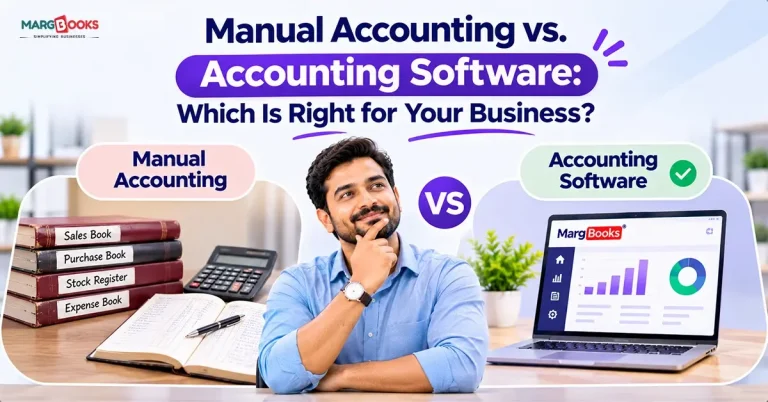
After the week comes to an end, all the information on sales is noted down in a ledger, the expenses are recorded on paper, the invoices from suppliers are kept in a box, and it’s only the bank statements that are present in PDF form in the email. This leaves the partners, the accountant, or the bank wondering about the month’s profit. Normally, business owners will say: “Give me two days.” This usually gets them thinking about switching from manual accounting.
Only applicable for small businesses with straightforward transactions, manual accounting has its limits. As soon as businesses start issuing invoices, filing GST (Goods and Services Tax) or tax forms, or experiencing exponential growth in sales, accounting software makes more sense. This happens sooner than many entrepreneurs anticipate. This guide will help you compare manual vs. online accounting in every aspect to make the best decision.
Manual Accounting vs. Accounting Software
In this section, we have given a comparison between manual accounting and accounting software based on different factors-
| Factor | Manual accounting | Accounting software |
| Setup | Almost none | Initial setup and opening balances |
| Daily effort | High; the same sale is often written several times | Lower; one entry updates ledgers and reports |
| Speed | Slow, especially at month-end | Fast; reports in seconds |
| Accuracy | Depends entirely on the person | Automatic calculations plus an audit trail |
| GST and tax readiness | Calculated and compiled by hand | Built-in tax calculation and return data |
| Reporting | Built manually | Real-time dashboards and statements |
| Data safety | Paper can be lost, damaged, or altered | Backups and user-level access control |
| Collaboration | One book, one person at a time | Owner, staff and accountant can work together |
| Scalability | Strains as volume grows | Handles growth without extra hours |
| Cost structure | Low cash cost, high time cost | Subscription or licence fee, lower time cost |
What Is Manual Accounting?
Manual bookkeeping is the process of keeping records of transactions manually, by way of cash books, journals, ledgers, and occasionally simple spreadsheets. It is required to record each transaction, making sure that it is accounted for and summarized by the end of the period when some financial statements like a trial balance, profit and loss account, or balance sheet can be created. For hundreds of years, accounting has been performed this way, which is still practiced today by many small businesses, home-based companies, and inexperienced freelancers.
What Is Accounting Software?
The operation of accounting programs is very similar to that of manual accounting. Easy example here is the fact that entering a transaction into the accounting system means that the ledgers and client balances have become current.
There is a predetermined set of functions in all accounting systems that include invoicing and inventory management. The only difference is that some of them require installation, while others can be easily accessed online.
Pros and Cons of Manual Accounting
Advantages
- The cost of starting is minimal
- Easy to use
- Does not need power or internet
- Can function with only a few transactions
Disadvantages
- Can be time-consuming since every transaction should be logged in the sales register, customer register, and cash book
- Can also be prone to mistakes, and identifying them may be difficult
- Reports are difficult to produce, so owners get less insight into their data
- Paperwork can be lost, ruined, or read incorrectly
- The process becomes more difficult as the number of transactions grows
Pros and Cons of Accounting Software
Advantages of accounting software:
- Shortens the time taken for entries, invoices, and bookkeeping
- Reliable calculations reduce errors
- Real-time reporting on profit, cash flow, and outstanding invoices
- Works in compliance with taxation laws and GST
- Provides backup and a secure way to access the information
- Offers ease of collaboration with the accountant
Disadvantages
- Requires a subscription fee
- Time and effort to learn the software
- Implementation and migration process takes time
- Applications in the cloud require a continual internet connection
Key Differences That Matter
Time and Efficiency
One evident difference is the way data is handled. In a traditional environment, the same transaction can be recorded multiple times. Through electronic processing, however, it is recorded once. In an organization that makes several hundred transactions on a regular basis, the amount of time wasted on duplicate entries is significant and could have been utilized for better productivity with customers and vendors.
Accuracy and Error Control
All of us make mistakes sometimes and it’s easier to mess up when we’ve been working too hard or when we are in a hurry. It is possible that one may spend several days or even weeks trying to find out they have entered something incorrectly in their accounts, but checking the document more thoroughly might take even longer. Computer programs do not prevent the users from entering wrong data, but they perform calculations automatically and keep records of all proceedings with every document.
Tax and GST Compliance
Here lies the difficulty that comes with manual accountancy. For example, if your firm follows GST regulations and is registered for the GST scheme, it will require you to compute sub-totals for tax in the invoices, evaluate input tax credit on purchases, do reconciliation on purchase records, and compute your GST return amounts. Because the software works according to the local tax laws, everything is performed automatically, and you run a very low risk of failing to fill in your form properly and on time.
Reporting and Decision-Making
Using traditional bookkeeping techniques often means that you only learn about the financial and operating conditions of your business when the month has come to an end. However, with modern accounting programs, you can now see crucial indicators like monthly receipts, expenses, overdue bills, and cash flow. As a result, you can track the situation with your business and take necessary measures to deal with overdue bills or unnecessary expenses, as well as determine whether your company has enough money to purchase extra inventory at the right time.
Data Security and Backup
The registry might be missing, may be damaged by water or fire or may also be deliberately changed. Accounting Software ensures protection against unpredictable processes, and moreover, most of them allow assigning access rights and the right to change the information.
Scalability
With manual record-keeping, it is manageable to keep track of twenty transactions a month, painful to track two hundred, and disastrous to track two thousand. However, software would be tailored to fit the growth in your business so that your management hours do not increase.
A Note on Cost
Although it seems that manual accounting is cheaper as there are no subscription fees involved, it may cost you significantly in your time, penalties, corrections, and accounting fees needed to solve the problems that arise. The software price is apparent, but it usually helps to reduce the overall costs. To find out more, read our accounting software cost vs. manual process guide.
Manual vs. Excel vs. Accounting Software
Many businesses land in the middle with Excel. It’s a real step up from notebooks, but it has limits.
| Factor | Notebook or register | Excel | Accounting software |
| Setup | Very simple | Simple | Needs initial setup |
| Error risk | High | Medium (formula and overwrite mistakes) | Lower |
| Automation | None | Limited; you build it yourself | Built in |
| Audit trail | Weak | Weak | Strong |
| Reporting | Manual | Semi-manual | Automatic |
| Multiple users | Difficult | Version confusion | Designed for it |
| Growth | Poor | Fair | Good |
Excel offers great flexibility, which can be an advantage, but also a drawback. Even a small mistake in the formula creation process or unintended adjustment can affect the integrity of your entire data, and you may not know it until later. It is good in the beginning, but with the growth of your business, using Excel for accounting will be more complicated and risky.
When Manual Accounting Is Still the Right Choice
There are several companies that do not need accounting software at all. In fact, manual bookkeeping is often enough if:
- You perform no more than a couple of transactions each month,
- Your business has no complex tax obligations,
- It is a small business or project,
- Most transactions are settled in cash, and you do the bookkeeping.
In such cases, there is little point in purchasing accounting software. It is more than enough for you to keep your documentation in order.
When Accounting Software Is the Better Choice
Accounting software proves its worth when your company is becoming busier and it is starting to become impossible to manage everything manually. It becomes especially helpful when:
- You create invoices or give credit to your clients regularly.
- Your business is registered for GST or any other tax that your business is liable for.
- You have to track your stock and inventory.
- A few people are involved in accounting operations.
- You do business in multiple locations.
- It takes you a few days to complete your monthly accounts.
- Your bank, investors, and accountants ask for your financial report often.
8 Signs You’ve Outgrown Manual Accounting
If you have been experiencing problems like these, then maybe it is time for you to implement accounting software:
- You have missed paying or filing a tax on time.
- Your bookkeeping balances seldom match your bank account balances.
- You spend immeasurable time calculating profit.
- Looking for an invoice or transaction seems a challenge in itself.
- Your financial records do not match.
- You are spending more than expected on accountants because of bookkeeping failures
- Too much time is required for administration, preventing you from concentrating on sales.
- You have a fear to forget some crucial financial information.
If you have experienced at least 3 of these situations, it might be reasonable for you to switch to accounting software since it helps to keep records in order and avoid all the problems above, as well as save time on accounting.
How to Choose the Right Accounting Software
It is essential to be careful while selecting accounting software. Do not buy just a popular title from the list of accounting software. Selection must be made after applying various criteria. Let us examine the main conditions individually:
- Tax returns and sales tax compliance: The program must provide all the taxes that are applicable for your area and type of business.
- Billing and inventory: If you sell goods, the packages must include the necessary billing tools and inventory management.
- Bank reconciliation: Accounting software must allow for easy comparison of bank transactions and accounting reports.
- Ease of operation: Software must be easy to use. The more complicated it is, the more problems various users may face.
- Financial reports: It is vital to check the availability of such reports as profit, cash flow, outstanding payments, and company performance.
- The backup and protection of your data: It is important to select a trusted data protection provider to avoid losing your financial data and make regular backups at all times.
- Support services: Having access to dependable support services will save you trouble when a technical failure occurs.
- Free trials and portability of data: Be sure to verify whether it is possible to test out the software before purchasing it, and whether you would be able to export your data in case you decide to drop it.
Make sure to inquire about the pricing details before making a decision.
How to Switch from Manual Accounting to Software in 5 Steps
Transitioning from manual bookkeeping to software-assisted bookkeeping can be simple if the process is well prepared. First, you need to take all records into account. It is essential to review your books and eliminate errors in the accounts as well as to clear all entries and balances. The next step is to adopt the right software and get it running. You should ensure that the software you select will help you solve all problems concerning your finances. Finally, you will need to import your data like the opening balance and thanks to the possibility of using modern technologies everything will be done smoothly also. Use the two systems concurrently: Maintain your old method and the new software for a period of not less than a month. Periodically compare the data to identify discrepancies. Acquire relevant experience and complete the process: When sure that the system functions properly and that the output data is consistent, you can start declining the old way of record keeping.
Common Mistakes to Avoid When Switching
While switching to accounting software can simplify processes, mistakes during the transition can lead to avoidable difficulties.
- Not cleaning up data beforehand: Don’t copy over old data without verifying it.
- Choosing software just because it is inexpensive: Sometimes cheaper options lack important features, so comparing functionality, support, and overall value could provide a better solution.
- Not training personnel: Ensure that everyone using accounting software understands how to operate it; otherwise, the system will fail to live up to expectations.
- Neglecting bank reconciliation: Regularly reconcile data from the accounting software with the materials provided by banks, especially at the beginning of a transition.
Conclusion
When it comes to accounting techniques, there’s no single solution for every company. If your business transactions are straightforward and involve proper documentation, manual accounting systems might do the trick.
On the other hand, if you’re finding that you’re spending hours working on keeping your financial records updated, handling tax deadlines, or just figuring out your finances, accounting software such as MargBooks may be handy. Ultimately, you have to realize what your business genuinely needs before making a choice. Evaluate the five questions above, detect the flaws in your current accounting procedures, and choose the software accordingly. Most importantly, run a free demo or trial version before buying the product to make sure it can actually simplify your work.
FAQs
Q1. Which is better, manual accounting or accounting software?
Business size and complexity play a big part in deciding whether manual bookkeeping is suitable for your business or not. For businesses with a limited number of transactions and straightforward records, manual bookkeeping could be an option. But for businesses that have consistent sales, purchases, using accounting software may help save time and reduce errors.
Q2. Is manual accounting still acceptable?
You may still decide to use manual accounting, as long as the paperwork is accurate and in compliance with the legal requirements. However, it is always wise to check that the particular regulations apply to your business.
Q3. Can Excel replace accounting software?
Excel can meet the requirements of basic calculations and record-keeping, especially when a business is newly launched. However, it does not have many accounting features that are included in full-fledged accounting programs. As transactions grow in number, it may become difficult to manage everything via Excel spreadsheets, which can lead to numerous mistakes.
Q4. Is accounting software safe for my financial data?
When it comes to choosing reliable software for bookkeeping, security features such as data encryption, access controls, and backup services are of utmost importance. However, the services offered by various software providers may not provide the same level of security. Thus, it is prudent to investigate the company’s standards of data protection before deciding on a solution.
Q5. How long does it take to move from manual accounting to software?
The process of switching between accounting systems can take from a number of days to several weeks and may depend on the complexity of your accounts and the volume of transferred data. Consulting with an experienced bookkeeper regarding whether or not to keep both systems during the transition phase is also a good idea.
Q6. Do small businesses really need accounting software?
Not necessarily. If your needs are simple, you may be able to do everything manually. However, bookkeeping software will allow you to significantly reduce the time spent on accounting functions as your business grows.

Aman Kannojia is the Digital Team Lead at MargBooks. He started out as an SEO Specialist and never lost his love for words. With 5 years of experience across banking, SaaS, and finance, both domestic and international, he brings strategy, leadership, and storytelling together. He doesn’t just manage a team, he builds one that creates.