Retail Software
 Distribution Software
 Retail Chain

How to Choose Garment Software for Wholesale Businesses: Key Features to Compare

In order to select garment software for a wholesale company, it is important to verify that it allows for sizing, coloring, and billing per article. It should also support GST compliance, e-invoicing, and e-way bills. The software should provide real-time stock information regarding godowns, be able to manage credits for each party, and process the orders and challans for each sale.
If you sell garments in bulk, you already know the problem. One shirt design comes in five sizes and six colours. That’s thirty variants before you’ve even counted the sets, the lots, and the different rates you give to different parties. Now multiply that by a few hundred designs.
Most billing software was never built for this. It works fine for a shop that sells “one item, one price.” It falls apart when a Surat trader wants 200 pieces in mixed sizes, a Delhi retailer wants a set price, and your accountant is asking why the stock register doesn’t match the godown.
How does one select the appropriate software for garment wholesale? This guide describes a number of things to look for while selecting software and questions to ask the vendor.
Why generic billing tools don’t work for garment wholesalers
A general billing Software treats every product as a single line. That’s fine for stationery or grocery. In garments, the product is the combination of article, size, and colour, and your stock only makes sense when you can see it at that level.
Wholesale adds another layer on top:
- Party-wise pricing: A big distributor and a small retailer rarely pay the same rate.
- Credit terms: You’re selling on credit, so outstanding balances and limits matter as much as the invoice.
- Challans and orders: Goods often move before the bill is final, and orders sit pending for days.
- Selling units: Sometimes you sell by the piece, sometimes by the set, sometimes by length.
Software built for garment distribution handles these as normal things, not workarounds. You can see how that looks in practice on MargBooks’ Garment Distribution Software, and the Apparel Distribution Software covers the same ground for apparel-focused businesses.
What is garment software for wholesale?
Garment software is a system that integrates billing, stock management, purchasing, order processing, bookkeeping, and GST calculations. Rather than having different files for billing, stock management, and bookkeeping, this system allows for the entry of a single transaction and the updating of all relevant files.
It keeps track of each product in terms of its business category, size, and color, so your inventory reflects exactly what you have on hand. The program can also cater to wholesale requirements like item-wise pricing, credit limits, challans, and back orders, as well as generate e-invoice and e-way bills for hauling goods from one city to another. For wholesalers, distributors, and traders dealing in hundreds of items, this translates into quicker billing, minimal stock inconsistencies, and detailed knowledge about what is selling and what is not, as well as who owes you money.

10 key features to compare before you buy Garment Software
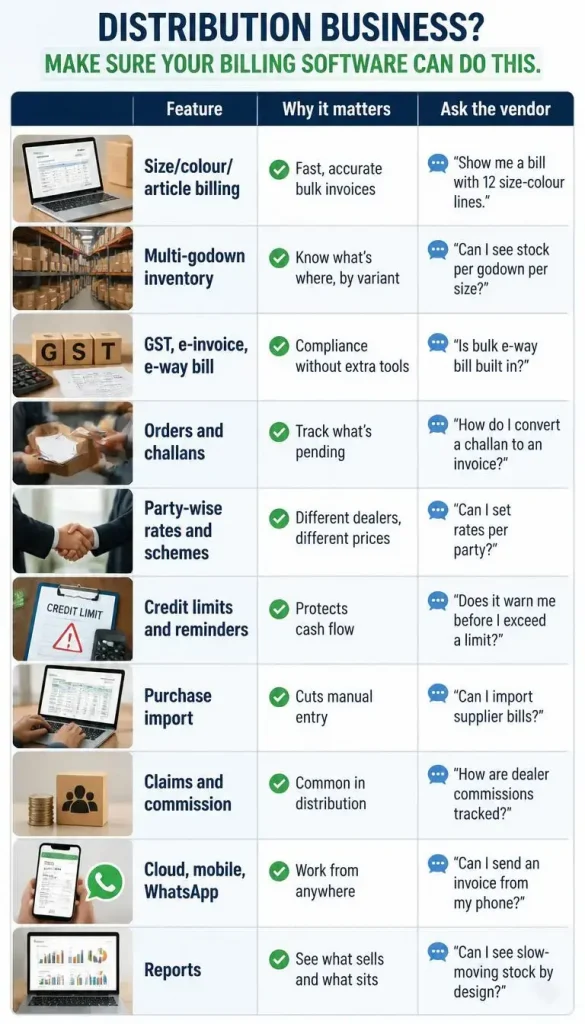
Here’s a checklist you can take into any demo. The right-hand column is the question I’d put to the vendor.
1. Size, colour and article-wise billing
This is the deal-breaker. If the Garment software can’t bill at the variant level, everything downstream (stock, returns, reports) becomes guesswork. During a demo, don’t accept a slide. Ask them to create an invoice with your own kind of order and watch how many clicks it takes.
2. Parameter-wise inventory across godowns
Wholesalers rarely keep everything in one place. You might have a main godown, a smaller one near the market, and goods lying with a job worker. Good software tracks stock by size and colour and by location, so you can answer “do we have the medium in navy?” without calling anyone.
3. GST, e-invoice and e-way bill
For a business moving goods between cities, this isn’t optional. Check that the GST Billing software creates GST-ready invoices, pushes B2B invoices to the e-invoice portal, and can generate e-way bills, ideally in bulk when you’re dispatching several consignments a day. If you need a separate tool or paid add-on for any of this, factor that into the price.
4. Orders and challans
Plenty of garment trade runs on orders taken today and dispatched later. You need to see pending orders, partly fulfilled orders, and challans that haven’t been billed yet. If the software can’t show this clearly, your team will end up tracking it in a notebook, which defeats the purpose.
5. Party-wise rates, schemes and discounts
Wholesale pricing is relationship-driven. Your best dealer gets a better rate, and you run a scheme in festival season. The Garment Billing software should let you set rates by party and apply discounts without manual calculation every time.
6. Credit limits and payment reminders
Late payment kills wholesale businesses more often than low sales do. Look for outstanding tracking by party, credit limit warnings at the time of billing, and payment reminders you can send without chasing people by phone.
7. Purchase management
If you buy from multiple suppliers, entering every purchase bill by hand is slow and error-prone. Online purchase import can save real time here.
8. Claims and commission tracking
If you work with agents or dealers on commission, or handle purchase and sale claims, check that it’s supported. Not every product has it.
9. Cloud access, mobile and WhatsApp invoicing
You won’t always be at the counter. Being able to check outstanding, view stock, or send an invoice on WhatsApp from your phone is genuinely useful, especially if you’re at a factory, a market, or on the road.
10. Reports that actually help you decide
Reports should answer real questions. Which designs are selling? Which are stuck? Which party is buying less than last year? If the reports are only summaries of what you already know, they won’t earn their place.
Wholesale vs retail garment software: which do you need?
Wholesale or distribution software focuses on bulk billing, orders, challans, credit, party-wise rates, and dispatch. Retail software focuses on the counter: barcode scanning, quick checkout, exchanges, loyalty, and customer profiles.
Many businesses are both. You might supply retailers and run your own showroom. If that’s you, look for software that handles both sides under one roof rather than running two systems.
How to Choose the Right Software: Step-by-Step Process
- Decide what kind of business you are. Pure wholesaler, distributor, or a mix with retail? This shapes everything else.
- Write two lists. Must-haves (variant billing, e-way bill) and nice-to-haves (online store, loyalty).
- Check compliance first. GST, e-invoice, and e-way bill should be there, not “coming soon.”
- Confirm access. Cloud, mobile, and how many users you can add.
- Run a real demo. Use your own articles, sizes, and party names. Avoid the vendor’s neat sample data.
- Ask about data migration. If you’re coming from Tally or Excel, find out what gets imported and whether it costs extra.
- Compare pricing properly. More on this below.
- Test the support. Call them once before you buy. How they answer tells you how they’ll answer later.
For a longer version of this process, MargBooks has a 15-step guide to choosing billing and accounting software for a garment business.
Common mistakes to avoid while choosing Garment Software
Here are a few common mistakes that you should avoid while choosing garment software-
1. Buying on price alone
A cheap plan looks great on the day you sign up. The trouble shows up a few weeks later, when you find it can’t bill by size and colour, or that e-way bills need a separate tool. Now someone on your staff is typing the same details twice, and that hour a day adds up to a lot more than the amount you saved. Work out the cost of the software plus the cost of the workarounds, then compare. The cheaper option often stops being cheaper.
2. Ignoring how it handles variants
Ask yourself how many times a day your team will pick a size and a colour. For a wholesaler it’s hundreds of times. If choosing a variant takes five clicks instead of two, or if you have to create a separate item for every colour, that irritation repeats in every bill, every stock check and every return. Sit with the billing screen for ten minutes and enter a real order. You’ll know quickly whether it suits you.
3. Skipping the demo
A brochure or feature list tells you what a product claims to do. It can’t tell you whether the billing screen is quick, whether the reports make sense, or whether the search finds an article when you type half its name. Ask for a demo, and bring your own data: a few real article names, a couple of your parties, and an order you actually handled last week. If the vendor is reluctant to work with your examples, take note of that.
4. Not planning for growth
Most people buy for the business they have today. But you may open a second godown next year, hire another billing person, or register a second GSTIN for a new branch. Check now what happens when that day comes. Are extra users and GSTINs available, and what do they cost? Is there an invoice limit you’ll cross by March? Moving to a different software after two years, with all your data, is a far bigger headache than choosing a plan with some room to grow.
5. Forgetting about e-way bills
If you send goods by transport, you’re generating e-way bills all the time, sometimes several a day. It’s routine work, so the way the software handles it matters a great deal. Find out whether e-way bills can be generated straight from the invoice, whether bulk generation is supported, and whether it’s included in your plan or sold as an add-on. Small delays here hold up a truck, and that gets noticed fast.
6. Ignoring your team
You may choose the software, but your staff will use it eight hours a day. If the person at the billing counter finds it confusing, they’ll quietly go back to their old register or Excel sheet, and you’ll end up paying for software that nobody really uses. Involve the people who’ll use it in the demo. Let them try it and ask questions. If they’re comfortable with it, adoption takes care of itself.
Conclusion
Pick software that understands garments first and billing second. Test variant billing, e-way bill, godown stock, and credit control with your own data. Count the real cost, including limits and add-ons. And don’t buy anything you haven’t seen run on your own orders. MargBooks software was built for Indian businesses, and its garment pages focus on the things covered above: size, colour, and article-wise billing, inventory management, order processing, e-way bill generation, purchase and sale claims, and invoices sent over WhatsApp, all accessible from any device. For wholesalers, the closest fit is the Garment Distribution Software.
If you’d like to see how it copes with your own designs and parties, book a demo and bring a real order with you. That’s the best test of any software, this one included.
FAQs
Q1. What is the best software for a garment wholesale business?
The best software should be able to manage different sizes, colors, product billing, and GST. All of that should be done through e-invoices and e-way bills, to have multiple storage locations, and to monitor customer credits. Choose two or three alternatives and check their performance with real orders you have.
Q2. What features should garment wholesale software have?
At minimum: variant-level billing and inventory, GST compliance, orders and challans, party-wise rates, credit control, purchase management, and useful reports.
Q3. Does garment software support size and colour-wise billing?
Software built for garments does. Generic billing tools usually don’t, so ask for a live demonstration rather than taking a yes on trust.
Q4. Can garment software generate e-invoices and e-way bills?
Many can, including bulk e-way bills. Confirm that it’s built into your plan and not sold as a separate add-on.
Q5. What’s the difference between garment retail and garment distribution software?
Distribution software focuses on bulk billing, orders, credit, and dispatch. Retail software focuses on counter billing, barcodes, exchanges, and customer loyalty.
Q6. How much does garment billing software cost in India?
The starting prices for entry-level annual programs might be in the thousands of rupees, while higher levels will add more charges depending on invoices, users, and modules. Make sure to check the cost on the provider’s current pricing page and to count additional fees.
Q7. Can I manage multiple godowns and users?
Most serious garment software supports this, but limits vary by plan, so check before you buy.
Q8. Is cloud-based garment software safe for business data?
Good cloud software uses protected hosting services, implements access control, and stores backups. Check the provider on how they provide permission and store backups.
Q9. Can I move my data over from Tally?
Some software supports Tally import. Ask what exactly transfers (masters, opening balances, stock) and whether migration is free.

Muskan is a versatile content writer with two years of experience across finance, software as a service (SaaS), astrology, and education technology (edtech). She turns complex ideas into compelling content, whether it’s SaaS metrics, financial shifts, or the alignment of the stars.