
 Retail Software
 Distribution Software
 Retail Chain

Bill to Ship to Invoice Format Explained

Invoices are a crucial part of business operations. They help ensure that transactions are recorded accurately, payments are tracked, and both buyers and sellers have a clear understanding of the goods or services exchanged. One specific type of invoice format that businesses often use is the “Bill to Ship to” invoice format. This type of invoice is particularly useful in situations where the buyer and the recipient of the goods are not the same person or entity. This comprehensive guide will explain everything you need to know about the Bill to Ship to invoice format.
What is a Bill to Ship to Invoice Format?
The Bill to Ship to invoice format is a type of invoice that lists two different addresses: one for billing and one for shipping. This format is common in businesses where the person or company responsible for paying for the goods or services is different from the person or company receiving the goods or services. For example, a company may place an order for office supplies to be delivered to a specific branch while the billing is directed to the company’s headquarters.
Key Elements of a Bill to Ship to Invoice
To create an effective Bill to Ship to invoice, it is important to include several key elements. These elements ensure clarity and help avoid confusion between the parties involved. Here are the essential components:
- Invoice Number: A unique identifier for the invoice.
- Invoice Date: The date when the invoice is issued.
- Billing Address: The address where the bill is to be sent.
- Shipping Address: The address where the goods are to be delivered.
- Customer Information: Details of the buyer including name, contact information, and any customer identification numbers.
- Shipping Information: Details about the shipping method, expected delivery date, and any tracking numbers.
- Itemized List of Goods/Services: A detailed list of the products or services provided, including quantities, descriptions, unit prices, and total amounts.
- Total Amount Due: The total cost, including any taxes, shipping fees, and discounts.
- Payment Terms: Instructions on how and when payment should be made.
- Additional Notes: Any other relevant information, such as special instructions or comments.
Benefits of Using a Bill to Ship to Invoice Format
Using a Bill to Ship to invoice format provides several benefits for businesses, especially those with complex supply chains and multiple locations. Here are some advantages:
Improved Clarity and Organization
By separating billing and shipping addresses, businesses can ensure that the right documents go to the right places. This separation helps avoid confusion and ensures that the accounting department receives the invoice while the warehouse or specific branch receives the goods.
Enhanced Record-Keeping
A Bill to Ship to invoice format aids in keeping accurate records. By clearly distinguishing between the buyer and the recipient, businesses can better track orders, deliveries, and payments. This format is particularly useful for auditing purposes and financial reporting.
Streamlined Operations
For businesses with multiple locations or departments, the Bill to Ship to invoice format streamlines operations. Orders can be placed centrally, billed to a single location, and shipped to various destinations. This process simplifies inventory management and order fulfillment.
Better Customer Service
Providing clear and accurate invoices can enhance customer satisfaction. Customers appreciate receiving detailed invoices that clearly outline the transaction, including where the goods will be shipped and where the bill will be sent. This transparency can build trust and strengthen business relationships.
How to Create a Bill to Ship to Invoice
Creating a Bill to Ship to invoice involves several steps. Here is a detailed guide on how to create one effectively:
Step 1: Choose an Invoice Template
Start by selecting an invoice template that allows for both billing and shipping addresses. Many accounting software programs and invoicing tools offer customizable templates specifically designed for this purpose.
Step 2: Enter Invoice Details
Fill in the basic details of the invoice, including the invoice number, date, and any customer reference numbers. These details help in tracking and managing invoices.
Step 3: Add Billing and Shipping Addresses
Enter the billing address where the invoice should be sent. This address is typically the location of the buyer’s accounts payable department. Next, enter the shipping address where the goods should be delivered. Ensure both addresses are complete and accurate to avoid any delivery or billing issues.
Step 4: Include Customer Information
Provide detailed information about the customer, including their name, contact information, and any customer identification numbers. This information is crucial for record-keeping and communication purposes.
Step 5: List Goods or Services
Create an itemized list of the goods or services provided. Include a description, quantity, unit price, and total amount for each item. This list helps the customer understand what they are being billed for and facilitates accurate payment.
Step 6: Calculate the Total Amount Due
Add up the total cost of all items, including any applicable taxes, shipping fees, and discounts. Clearly display the total amount due at the bottom of the invoice.
Step 7: Specify Payment Terms
Outline the payment terms, including the due date, accepted payment methods, and any late payment penalties. Providing clear payment instructions helps ensure timely payment.
Step 8: Add Additional Notes
Include any additional notes or instructions that may be relevant to the transaction. This section can be used to provide special shipping instructions, comments, or thank-you messages.
Step 9: Review and Send the Invoice
Before sending the invoice, review all the details carefully to ensure accuracy. Once you are satisfied that everything is correct, send the invoice to the appropriate billing address.
Common Challenges and Solutions
While the Bill to Ship to invoice format is beneficial, it can present some challenges. Here are common issues businesses may encounter and solutions to address them:
Address Errors
Incorrect billing or shipping addresses can lead to delays and complications. Double-check all addresses before finalizing the invoice and consider using address verification tools to ensure accuracy.
Payment Delays
Payment delays can occur if the billing address is incorrect or if the invoice lacks clarity. Ensure that the billing address is accurate and provide clear payment instructions to avoid delays.
Communication Breakdowns
Miscommunication between the buyer, recipient, and accounts payable department can cause issues. Maintain open lines of communication and provide contact information on the invoice for any questions or clarifications.
Software Limitations
Not all invoicing software supports the Bill to Ship to format. Choose software that offers customizable templates or consider upgrading to a more robust invoicing solution if necessary.
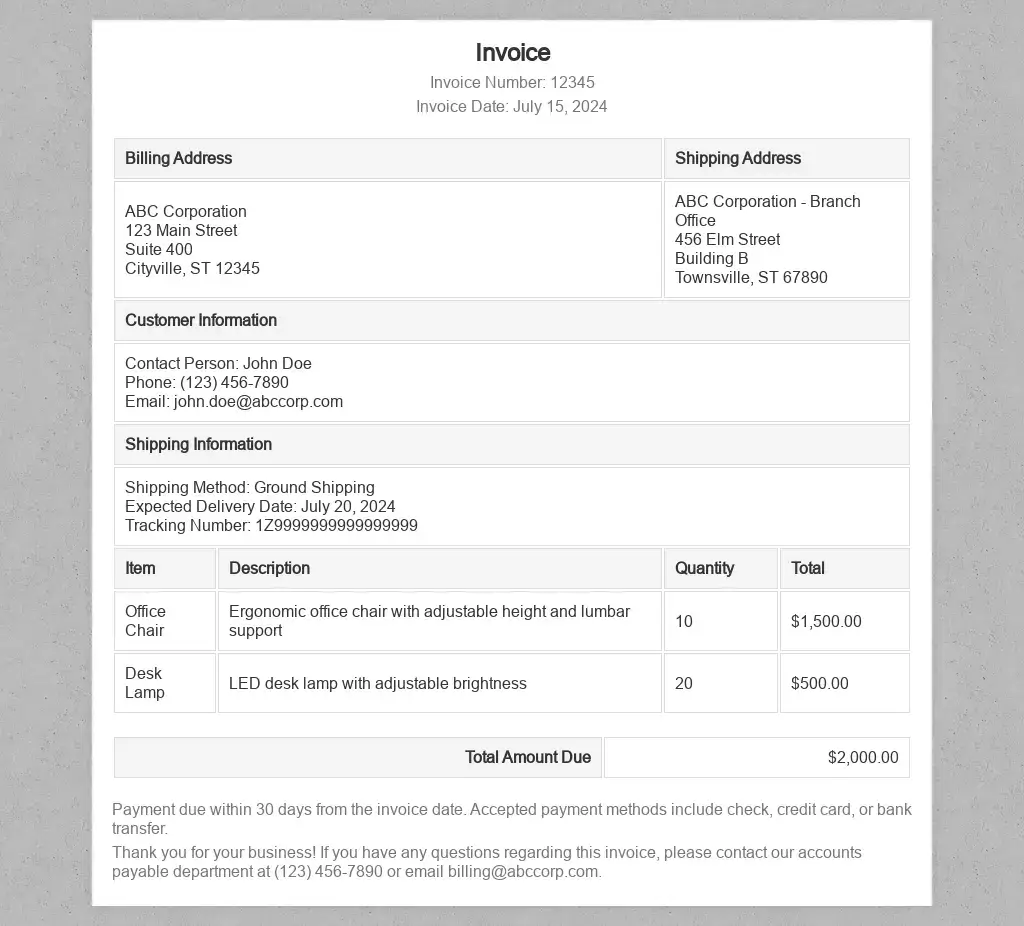
Example of Bill to Ship to Invoice Format
|
|||
|
|||
| Bill To | Ship To | ||
|
ABC Corporation 123 Main Street, Suite 400 Cityville, ST 12345 Contact: John Doe Phone: (123) 456-7890 Email: john.doe@abccorp.com |
ABC Corporation – Branch Office 456 Elm Street, Building B Townsville, ST 67890 Contact: Jane Smith Phone: (987) 654-3210 Email: jane.smith@abccorp.com |
||
| Payment Method | Check #12345 | ||
|
Ground Shipping Expected Delivery Date: July 20, 2024 Tracking Number: 1Z9999999999999999 |
|||
| Item | Price | ||
|
Office Chair Description: Ergonomic office chair with adjustable height and lumbar support Quantity: 10 |
$1,500.00 | ||
|
Desk Lamp Description: LED desk lamp with adjustable brightness Quantity: 20 |
$500.00 | ||
| Total: $2,000.00 | |||
| Payment due within 30 days from the invoice date. Accepted payment methods include check, credit card, or bank transfer. | |||
| Thank you for your business! If you have any questions regarding this invoice, please contact our accounts payable department at (123) 456-7890 or email billing@abccorp.com. | |||
Tips for Optimizing Bill to Ship to Invoices
To make the most of the Bill to Ship to invoice format, consider the following tips:
Use Professional Invoicing Software
Invest in professional invoicing software that offers customizable templates and advanced features. This software can help streamline the invoicing process and ensure accuracy.
Implement Standard Procedures
Develop standard procedures for creating and sending Bill to Ship to invoices. Train your staff on these procedures to maintain consistency and avoid errors.
Maintain Accurate Records
Keep detailed records of all invoices, including copies of Bill to Ship to invoices. This documentation is essential for tracking payments, resolving disputes, and preparing for audits.
Regularly Review and Update Templates
Regularly review and update your invoice templates to ensure they meet your business needs. As your business evolves, your invoicing requirements may change, so it’s important to keep your templates current.
Communicate Clearly with Customers
Ensure that your customers understand the Bill to Ship to invoice format and its benefits. Provide clear instructions on how to interpret the invoice and who to contact for questions or issues.
Conclusion
The Bill to Ship to invoice format is a valuable tool for businesses that need to separate billing and shipping addresses. This format enhances clarity, improves record-keeping, and streamlines operations. By following best practices and addressing common challenges, businesses can effectively utilize the Bill to Ship to invoice format to support their operations and improve customer satisfaction.
Also read
- Why Sales Order Processing is Important for Accurate Billing and Delivery?
 Every sale starts with a promise to provide the right product to the right price and time. That promise is fulfilled through Sales Order Processing. It links together the sales, inventory, accounts and logistics into a single controlled workflow. If… Read more: Why Sales Order Processing is Important for Accurate Billing and Delivery?
 - How to Ensure Data Security in Your Invoice Management SystemIn today’s digital age, businesses rely heavily on technology to streamline operations and improve efficiency. An invoice management system plays a crucial role in managing financial transactions and maintaining accurate records. However, with the increasing reliance on technology comes the… Read more: How to Ensure Data Security in Your Invoice Management System
- GST Invoice Software: Making Billing EasyIn today’s busy world of business, being efficient is super important. One big thing that needs to be super efficient is billing. With new technology, old-fashioned manual billing is out of date and can make a lot of mistakes. That’s… Read more: GST Invoice Software: Making Billing Easy
- GST Composition Invoice FormatThe GST (Goods and Services Tax) Composition Scheme is a straightforward and user-friendly taxation scheme designed for small businesses in India. This scheme reduces the compliance burden for small taxpayers by allowing them to pay GST at a fixed rate… Read more: GST Composition Invoice Format
- Everything You Should Know About Car Bill InvoiceWhen it comes to car purchases, sales, repairs, or rentals, a car bill invoice is an essential document. This invoice serves as a record of the transaction and provides a detailed account of the services rendered or goods sold. Understanding… Read more: Everything You Should Know About Car Bill Invoice



Frequently Asked Questions
What is a bill-to/ship-to invoice format?
The bill-to/ship-to bill format style is distinguished by its two separate address blocks. The Bill To address signifies the organization making the payment, while the Ship To location represents the place where the items are sent. This type of billing is used when there are discrepancies between the billing party and the receiving party. An example is a company whose billing is done at its headquarters while it receives products in an IT branch or warehouse.
What does bill-to/ship-to means?
According to the definition of the term “bill-to/ship-to”, the invoice is drawn up for one party or address, and the goods are to be sent to another party or address. The first party pays for the purchase, while the second party gets the goods. For example, in a retail setup, the retailer orders the goods from the manufacturer, gets the invoice in his name, and has the goods sent to the end customer.
What is the bill-to/ship-to model in GST?
The GST system introduces the “bill-to, ship-to” concept in the form of a three-way supply of goods. In a “bill-to, ship-to” arrangement, the parties involved include:
1. Supplier (A) – The person who supplies the goods and issues an invoice.
2. The buyer/middleman (B) – The party that places the order, which A bills for the goods directly.
3. Recipient (C) – The party that receives the goods following directions from B.
The transaction sees A delivering the goods directly to C, while the invoices indicate that two supplies have been made from A to B and from B to C. In such cases, the GST law allows for B’s place of business to be interpreted as the place of supply in the first transfer of the supplies, as A makes the delivery upon B’s directions. However, taxpayers are encouraged to check with a GST expert.
What is the invoice address, and how is it different from the shipping address?
The invoice address is the address where payment is handled by the buyer’s accounting department. The shipping address is the location where the goods are physically sent. Although the two addresses may be the same, the separate listings of the two addresses on the bill-to/ship-to invoice ensure that there will be no confusion between billing and delivery.
What is a bill to address?
The necessary bill is the one that conveys the address of the payer. This contains the legal name of the payer, the address of the registered office, other contact information, and GSTIN for an Indian payer. It determines the payer’s liabilities as well as the tax-credit claiming address.
What is the ship-to meaning in an invoice?
The term “ship to” on an invoice refers to the delivery address as well as the name of the receiving person or business. This term is commonly used by warehouse and logistics teams and is often found in transport documents such as e-way bills. The payer is sometimes different from the ship-to party.
When should I use a separate bill-to and ship-to address?
Separating an address is required in the following situations:
When the head office is paying, while a regional office or warehouse is getting the goods.
When you are a wholesaler or distributor and would like the vendor to deliver the goods directly to your customer.
When the customer is sending the goods as a gift or sending the goods to someone else.
When the seller is shipping to the consumer but invoicing a different party.
Which details should appear in the bill-to and ship-to sections?
Every section must have:
The name of the entity and its full address
The contact person’s phone and email number
GSTIN for GST invoices
Full name and code of state, needed for determining the place of supply
Also, show the invoice number, date of invoice, and details of items with HSN codes along with tax breakup and final amount.
Is a separate ship-to address allowed on a GST invoice?
Certainly. The Goods and Services Tax invoice can indicate a different shipping address from the billing address of the taxpayer. It is essential to make sure that the recipient and delivery details are accurate and mention the appropriate place. The movement of the goods calls for the issuance of the e-way bill mentioning the correct bill-to and ship-to.
How can billing software handle bill-to and ship-to addresses?
Software for billing like MargBooks allows recording of many customer addresses, selection of a bill-to address and ship-to address in every invoice, and automatic GST calculation according to the place of supply. This way, manual errors are reduced, invoicing is quicker, and records remain accurate during audits and GST returns.

MargBooks, a product of Marg ERP Ltd., is a revolutionary cloud-based billing & accounting solution for every business where the business owner can manage the business from anytime anywhere on any device. MargBooks is your one-stop platform for managing your accounting, organizing your transactions, controlling your finances and managing your inventory. It’s a single secure platform to keep up with your company’s bills and invoices, reconcile your transaction, file GST return easily, experience connected banking etc.